The core flaw of direct text-to-video generation is cognitive overload: the video model is forced to simultaneously conceptualize character anatomy, architect spatial geometry, choreograph lighting, and calculate camera trajectory. The inevitable result is visual instability — shifting facial features, morphing props, and disorienting camera jumps.
The solution lies in deliberate separation of concerns: an advanced image model (GPT Image 2) handles visual art direction, while the video model (Seedance 2.0) focuses exclusively on motion and physics. GPT Image 2 locks character traits, apparel textures, lighting cues, and panel sequences long before video rendering begins.
This workflow guarantees:
- Character Consistency: The storyboard establishes facial landmarks, wardrobe, color grading, and props prior to the first frame.
- Cinematic Camera Control: Seedance 2.0 dedicates its attention to motion velocity, trajectory, and smooth transitions rather than scene invention.
- Predictable Production Timings: Directors curate and adjust narrative pacing before launching resource-heavy video generation.
1. Practical Case 1: Fashion Video Storyboard and Generation
Fashion and lifestyle videos demand unmatched aesthetic stability: precise fabric weaves, unmistakable model likeness, and rhythmic pacing tailored for social media feeds.
1.1. Scene Concept: Luxury Street Fashion Scan in London
The concept for this 15-second commercial ("Scan My Outfit"): a poised woman walks down an upscale London boutique boulevard. Her phone alerts her to an incoming request; she pauses gracefully to answer. The camera executes a fluid head-to-toe scan with floating editorial brand badges, resolving in a confident editorial hero frame.
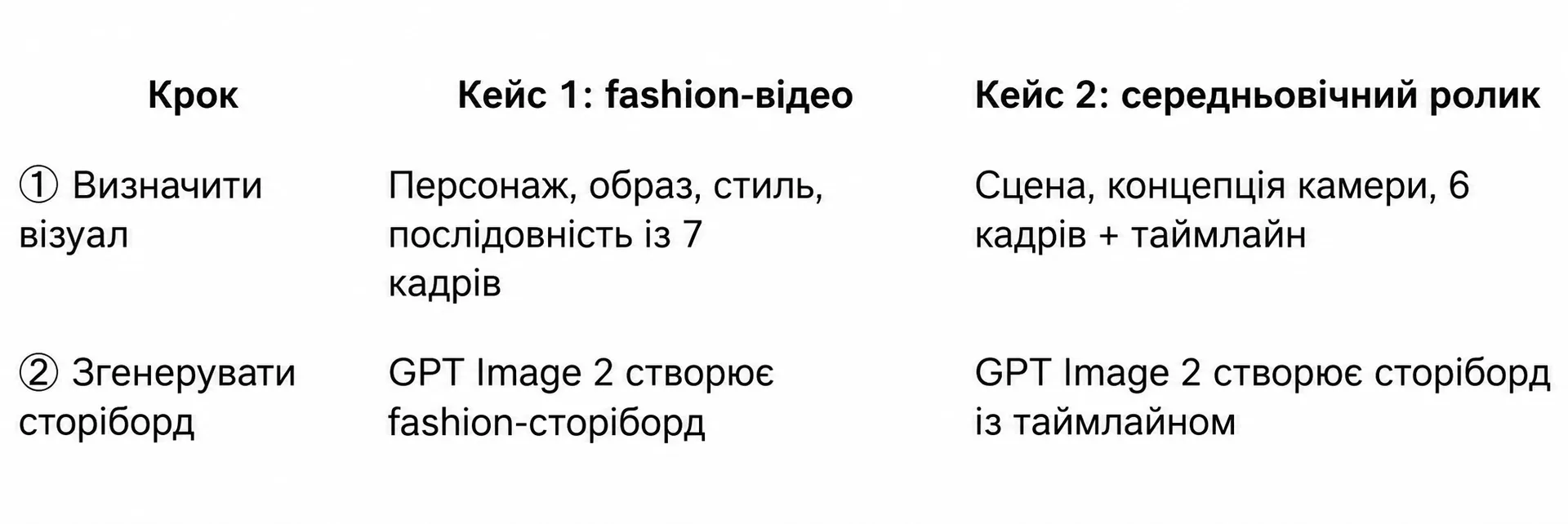
1.2. Step 1: Generating the 7-Panel Storyboard in GPT Image 2
Input this structured master prompt into GPT Image 2, specifying character specifications, wardrobe details, and panel requirements:
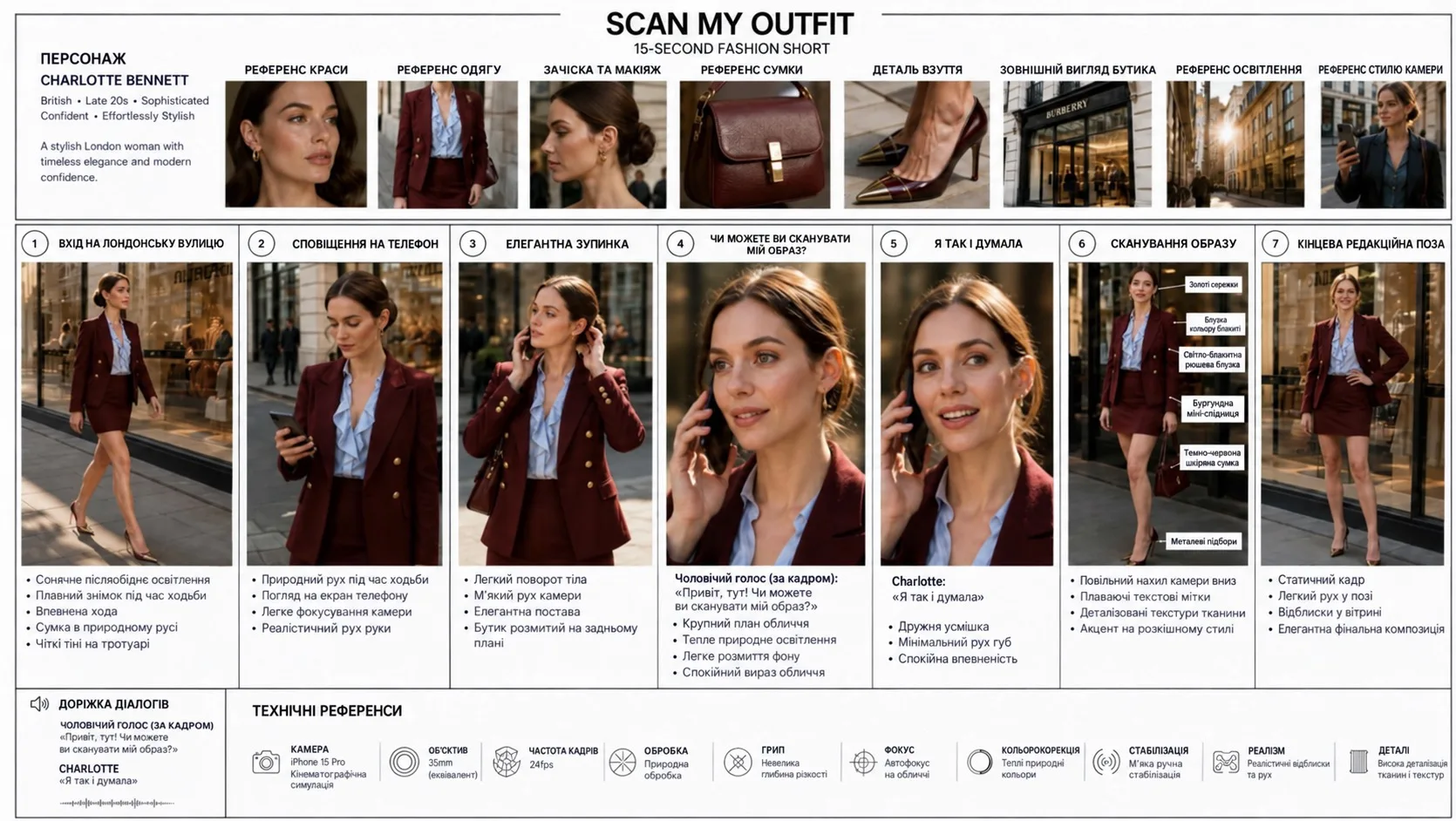 SCAN MY OUTFIT 15-SECOND FASHION SHORT — illustration 1
1.3. Step 2: Generating the Motion Video in Seedance 2.0
Feed the generated storyboard into Seedance 2.0 as an Image Prompt and steer movement through an action-oriented prompt:
By decoupling visual architecture from camera choreography, high-end commercial video is produced in two swift iterations without location scoutings or physical film crews.
2. Practical Case 2: Cinematic Video (Historical Scene)
The second case explores high-density historical staging: a twilight medieval marketplace where the camera navigates a crowded street and smoothly pushes into a tavern.
2.1. Concept of a 12-Panel Medieval Narrative Sequence
Direct single-image prompting produced erratic artifacts: crowd members dissolved, horse carts vanished mid-frame, and the tavern doorway materialized abruptly. The solution was drafting a 12-panel graphite storyboard sheet that established continuous camera motivation across every cut.
2.2. Step 1: Generating the Sketch Storyboard in GPT Image 2
 Medieval Scene Storyboard Sheet — illustration 2
2.3. Step 2: Continuous Camera Generation in Seedance 2.0
The Seedance prompt coordinates timing cues, making each moving element naturally trigger the next shift in perspective:
| Evaluation Metric | Single Image Workflow | Storyboard-Driven Pipeline |
|---|---|---|
| Render Attempts (Iterations) | 5+ attempts with erratic results | 1 successful shot on initial pass |
| Shot Transitions | Random, abrupt, jarring neural cuts | Every transition motivated by scene physics |
| Narrative Continuity | Props disappear, background geometries drift | All 12 beats and character states preserved |
| Lighting Consistency | Color temperature flickers unpredictably | Consistent dusk torchlight and tavern interior |
3. Motivated Continuous Camera Movement Technique
Why does a storyboard revolutionize video stability? A single frame contains insufficient spatial cues for diffusion models to infer trajectory. A multi-panel storyboard compresses cinematic staging into a single reference plane, providing a comprehensive spatial blueprint.
3.1. Spielbergian Cinematography: Motivated Camera Mechanics
This technique originates from classical Hollywood cinematography: the camera never moves arbitrarily (Motivated Camera Movement). Every reframing is compelled by physical events in the mise-en-scène:
- A cart passes across frame → the camera naturally locks onto its movement.
- A swinging shop sign obscures view → clearing frame to reveal scattering chickens.
- A running urchin darts past → camera velocity carries forward through the tavern threshold.
3.2. Focus Handoff Chain: From Street Cart to Armored Knight
Because every motion vector begins at the culmination of the previous action, the 15-second clip reads as an unbroken Steadicam long take.
 Continuous Camera Motion Diagram — illustration 3
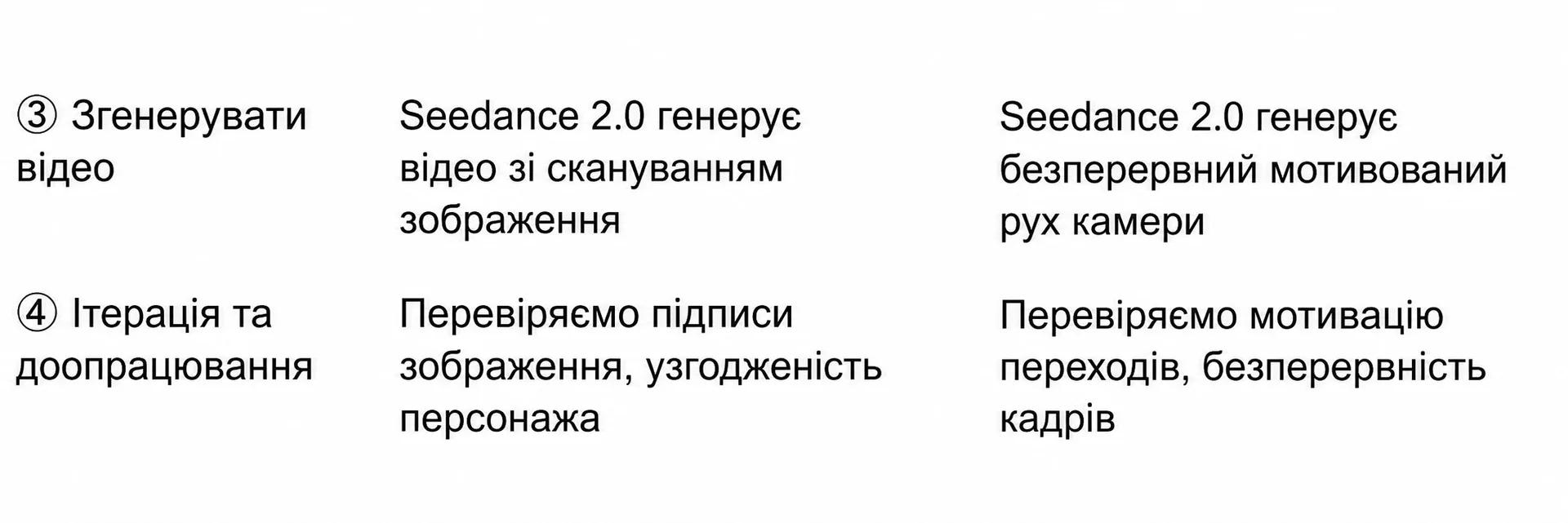
4. Standard 4-Step Production Pipeline
Every commercial production utilizing GPT Image 2 and Seedance 2.0 adheres to a standardized four-stage lifecycle.
4.1. Workflow Stages: From Conceptualization to Final Master
| Step | Action | Platform | Core Deliverable |
|---|---|---|---|
| Step 1 | Visual Conception | Text Brief | Define subject, art direction, lens specs, and narrative beats |
| Step 2 | Storyboard Generation | GPT Image 2 | Synthesize 4–12 panels with direction arrows and timeline tags |
| Step 3 | Image-to-Video Synthesis | Seedance 2.0 | Animate storyboard reference with motivated camera movement |
| Step 4 | Review and Polish | Seedance / NLE | Audit continuity, refine motion speed, and export master clip |
4.2. Quality Assurance and Iterative Refinement
The cardinal production rule: perfect the visual storyboard before generating motion. If wardrobe details fluctuate or spatial logic fails in the storyboard sheet, the video engine will magnify these discrepancies across hundreds of frames.
5. Key Principles of Video Prompt Writing
Crafting prompts for image generators versus video diffusion engines requires fundamentally contrasting strategies.
5.1. Prompts for GPT Image 2: Comprehensive Visual Density
For the image generator, maximum descriptive detail is mandatory:
- Detailed anatomy and styling (age, facial structure, eye color, hairstyle, jewelry).
- Textile textures and environmental surfaces (ribbed silk, weathered leather, wet cobblestone).
- Optical specifications (35mm prime, f/1.8 aperture, anamorphic bokeh, warm grading).
- Action descriptions annotated inside each storyboard frame.
5.2. Prompts for Seedance 2.0: Prioritizing Kinetic Action and Camera Velocity
Inside video generation prompts, do not re-describe static visual assets — the model reads them directly from the image reference. Dedicate prompt tokens entirely to kinetics:
- Direction and velocity of camera maneuvers (smooth tracking, slow push-in, focus handoff).
- Explicit timeline brackets (
0:00–0:03,0:03–0:05). - Cause-and-effect transitions explaining why the camera pivots toward new focal points.
6. Additional Use Cases and Advanced Direction Tips
This storyboard-to-video methodology extends far beyond fashion vignettes and period pieces.
6.1. Industry Applications: From Gaming Cutscenes to Commercial Advertising
- Game CG Cutscenes: Create three-view character turnarounds, environment concept sheets, and action storyboards for indie game trailers without dedicated 3D animation teams.
- Athletic Brand Commercials: Develop dynamic product storyboards highlighting footwear traction and breathable mesh, followed by rapid-cut energetic video renders.
- AI Webtoon and Drama Series: Produce episodic 30-to-60-second installments while preserving character facial models across consecutive episodes.
- Sports Instructional Guides: Step-by-step breakdown of technical movements (tennis serves, swimming strokes) in fluid slow motion.
- Architectural Real Estate Walkthroughs: Seamless walkthroughs progressing from open foyers through living quarters onto terrace lounges.
6.2. Professional Director Guidelines for Flawless Output
- Require at least 3–4 panels: Single-frame inputs provide zero directional velocity for complex camera arcs.
- Incorporate foreground obstructions: Passing vehicles, fluttering banners, or doorway thresholds create natural masks for seamless reframing.
- Budget for iterative passes: Expect 2–3 prompt speed calibrations before locking the final camera momentum.
7. Workflow Architecture: GPT Image 2 + Seedance 2.0
The GPT Image 2 and Seedance 2.0 combination represents a benchmark in generative filmmaking by strictly dividing creative responsibilities.
7.1. Division of Labor: Static Design vs. Dynamic Animation
- GPT Image 2: Masters spatial design, color harmonies, lighting setups, and typography.
- Seedance 2.0: Governs the temporal dimension, camera inertia, physics simulations, and subject motion.
7.2. Production Economics and Rapid Hypothesis Testing
Traditional live-action pre-visualization requires days of illustrator effort and storyboard artist fees. Using this AI workflow, full commercial directions are prototyped and evaluated in minutes, de-risking creative investments before major production budgets are deployed.
8. Frequently Asked Questions (FAQ)
8.1. Answers to Common Storyboard Workflow Inquiries
What is the "Storyboard to Video" AI workflow?
It is a two-step production method where a multi-panel visual storyboard is generated first using an advanced image model, then fed into a video model to guide camera trajectory and subject motion.
Why shouldn't I generate videos directly from text?
Text-to-video engines frequently hallucinate inconsistent character faces and morphing background structures. Supplying an initial multi-panel storyboard anchors visual geometry before temporal calculations begin.
What is the optimal storyboard format for Seedance 2.0?
A 16:9 horizontal infographic containing 4 to 12 sequentially numbered panels, equipped with motion directional arrows and concise focal length annotations (e.g., 35mm tracking).
How do I troubleshoot jittery camera movements in Seedance?
Replace abrupt prompt words with smooth cinematic descriptors (glide, continuous Steadicam tracking, slow push-in) and anchor each camera transition to a physical foreground event.