ChatGPT can function as a website builder in two fundamentally distinct ways: generating complete, production-ready code (HTML, CSS, and vanilla JavaScript) in a conversational dialogue for self-hosting, or assembling and publishing pages directly via OpenAI's cloud environment, ChatGPT Sites.
The first approach functions across all subscription tiers (including Free) and provides 100% code ownership. The second approach is strictly restricted to paid subscriptions and comes with rigid technical, regional, and commerce constraints that creators must evaluate beforehand.
1. Approaches to Website Creation with ChatGPT
Selecting the right method dictates your deployment toolchain, ongoing operational costs, and control over digital assets.
1.1. In-Chat Code Generation vs. ChatGPT Sites Hosting
- Method 1: Conversational Code Generation. You formulate a structured brief, ChatGPT outputs unified or modular code files, you preview the output locally in your browser, perform iterative styling revisions, and publish to GitHub Pages, Cloudflare Pages, or Netlify. Works on every tier, and you retain complete, unencumbered ownership of all source code.
- Method 2: ChatGPT Sites. A hosted web environment inside ChatGPT Work that generates visual layouts and hosts them on OpenAI's infrastructure. Available only on paid accounts (excluding Free and Go), unavailable in the EEA, Switzerland, and the UK at launch, and strictly forbids commercial transactions.
Crucial distinction: ChatGPT is a conversational text interface, not a visual canvas. Traditional no-code builders (Framer, Webflow) provide real-time visual canvas feedback. With ChatGPT, you direct design through natural language instructions, making the precision of your prompting strategy the single most critical factor for success.
1.2. Choosing the Optimal Approach for Your Project
- In-Chat Code Generation (Method 1) is ideal for landing pages, professional portfolios, local business websites, event pages, and editorial content. The resulting static assets are host-agnostic and migrate effortlessly to any CDN or web server.
- ChatGPT Sites (Method 2) was architected primarily for internal organizational use: operational dashboards, project trackers, rapid interactive mockups, and lightweight utilities for teams already working within ChatGPT Work.
2. Step-by-Step Website Generation in ChatGPT Chat
This workflow represents the universal standard for AI-assisted web development. It operates seamlessly across Free, Plus, Team, Enterprise, and Pro plans by capitalizing on what large language models do best: authoring semantically clean code and persuasive marketing copy based on strict constraints.
2.1. Step 1: Structured Brief Prompt
Never start with ambiguous prompts like "make me a nice website." A professional brief must establish six core pillars: business profile, target audience persona, primary conversion action (CTA), section hierarchy, aesthetic identity, and technical constraints.
Every bracketed variable represents an intentional strategic decision. The more precise your input (e.g., "emergency plumber in Austin, visitors need immediate dispatch within 30 minutes"), the sharper and less generic the final output will be.
2.2. Step 2: Approving Structure Before Generating Code
For web projects spanning more than two screens, always mandate an architectural checkpoint between briefing and code synthesis. Revising a structural outline in text takes thirty seconds, whereas reorganizing 500 lines of generated HTML requires redoing the entire document.
Evaluate the proposed wireframe critically: ensure social proof precedes the inquiry form, verify pricing transparency, and confirm logical value progression.
2.3. Step 3: Code Generation and Browser Testing
Once you sign off on the architecture, ChatGPT will generate the complete source document. Save this output locally as index.html and launch it in any modern web browser.
ChatGPT cannot visualize its rendered output. You are the rendering engine and quality assurance tester. Open browser developer tools (F12 or Cmd+Option+I) and immediately evaluate responsiveness at mobile screen dimensions (375–390px width) before moving to subsequent steps.
2.4. Step 4: Rewriting and Polishing Marketing Copy
Unprompted AI copy is notorious for bland corporate clichés: "Welcome to our website! We empower businesses with next-generation solutions." Execute a dedicated second pass that explicitly outlaws conversational fluff:
2.5. Step 5: Refining Visual Design with Measurable Rules
Subjective design requests ("make it pop" or "make it look modern") yield erratic visual modifications. High-yield design prompts enforce precise dimensional metrics: whitespace, typographic scale, color ratios, and accessibility standards.
2.6. Step 6: Launch Preparation, Technical SEO, and Hosting
With layout and copy locked down, finalize production metadata and prepare deployment:
Publishing a single static index.html file via GitHub Pages, Netlify, or Cloudflare Pages is 100% free, takes under 3 minutes, and includes automatic SSL certificate management (HTTPS).
3. Capabilities and Launch Process in ChatGPT Sites
ChatGPT Sites is a turnkey cloud publishing environment developed by OpenAI inside ChatGPT Work for rapid web application prototyping and distribution.
3.1. Plan Availability and Regional Restrictions
- Eligible Subscriptions: ChatGPT Sites is exclusively available to paid subscribers across Pro, Pro Lite, Enterprise, Edu, Team, and Plus plans. Free and Go accounts are entirely excluded.
- Geographic Availability: During the initial beta deployment, the feature remains blocked across the European Economic Area (EEA), Switzerland, and the United Kingdom due to regulatory compliance standards.
- Administrative Governance: Within Enterprise workspaces, domain publishing and external accessibility are governed by workspace administrators.
3.2. Step-by-Step Deployment Workflow in ChatGPT Work
- Open ChatGPT in your browser or desktop client, navigating directly to the Work workspace or enabling Codex mode (Sites is omitted from legacy chat windows).
- Issue your website brief explicitly mentioning the keyword
websiteor invoking@Sites. Specify audience goals, interaction logic, and upload source data or reference documents. - Review the secure interactive live preview hosted directly on OpenAI cloud infrastructure.
- Iterate on layout and features through conversational prompts while monitoring the real-time preview.
- Snapshot the production release and configure visibility permissions: private (creator only), internal team (workspace), or public web access.
- Connect your custom root domain or subdomain by configuring CNAME and TXT records within your DNS host provider.
4. Technical and Regulatory Constraints of ChatGPT Sites
Despite seamless one-click hosting, ChatGPT Sites imposes severe structural boundaries that rule out commercial e-commerce deployments.
4.1. Comprehensive Matrix of Platform Constraints
Review the platform constraints and their operational consequences below:
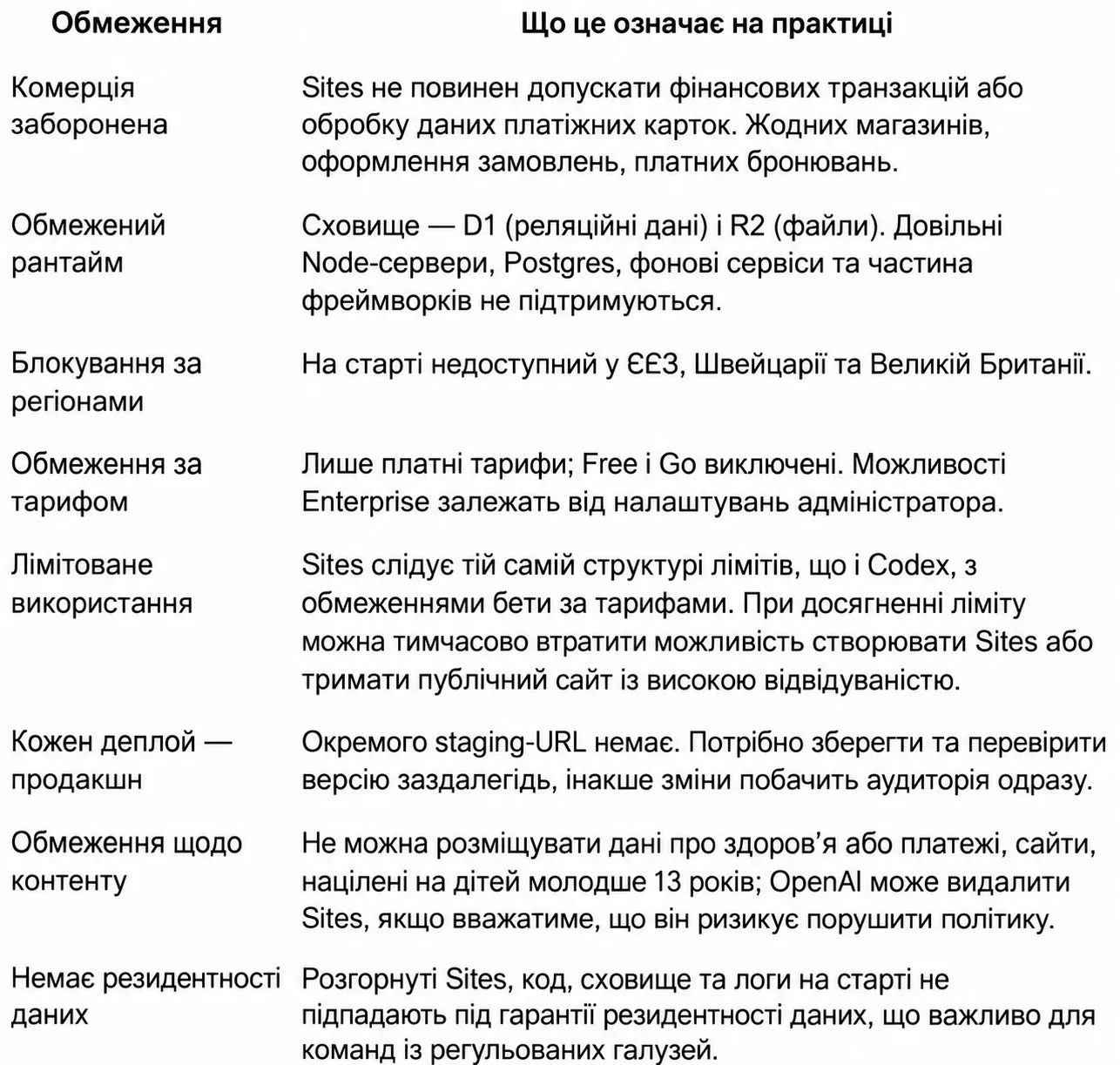 ChatGPT Sites platform constraints matrix — illustration 1
| Constraint Dimension | Platform Architecture | Operational Impact |
|---|---|---|
| Commercial Prohibition | Strict ban on financial transactions | Cannot process payments or store cardholder data. No storefronts, checkout flows, or paid booking engines. |
| Constrained Runtime | Cloudflare D1 database & R2 storage | No custom Node.js servers, PostgreSQL clusters, background workers, or heavy backend frameworks. |
| Geographic Block | Regulatory compliance limitations | Unavailable for users and developers located in the EEA, Switzerland, and the United Kingdom. |
| Tier Requirements | Premium subscriptions only | Users on Free or Go plans have zero access to the Sites hosting infrastructure. |
| Rate Limits | Shared OpenAI Codex limits | Reaching usage ceilings temporarily disables site building and degrades traffic handling. |
| Deployments Are Production | Absence of separate staging environments | Every published modification immediately alters the live public endpoint. |
| Content Policy Enforcement | Strict automated OpenAI moderation | Health data, financial apps, and content targeting children under 13 risk immediate takedown. |
| Data Residency | Shared global infrastructure | Deployments, storage, and logs lack sovereign regional residency guarantees. |
5. Common Development Mistakes and Optimization Guidelines
Analyzing hundreds of generative web builds reveals that 90% of workflow breakdowns stem from avoidable prompting missteps.
5.1. Attempting to Fit the Entire Website into a Single Giant Prompt
Overloading a single prompt with copy, interactive widgets, styles, and SEO parameters forces the LLM to compromise depth, resulting in truncated code blocks or generic placeholders (<!-- Add more items here -->). Segment development into a modular sequence: brief → outline → HTML/CSS → copywriting → styling → final SEO polish.
5.2. Neglecting Mobile Viewport Testing
ChatGPT cannot inspect visual rendering. It will readily create fixed headers that overlap mobile navigation overlays without detecting the layout collision. Continually test your page in mobile emulation view after every major style iteration.
5.3. Pasting Snippets Instead of the Full File Context
When an element malfunctions, users often paste only an isolated 10-line snippet. Lacking the surrounding container classes and cascade context, ChatGPT frequently returns a fix that breaks sibling elements. Always supply the full document:
5.4. Publishing First-Draft AI Copy Without Fact-Checking
First-generation model copy is syntactically sound but conceptually generic. Apply this simple litmus test: replace your company name with a competitor's brand. If the statement remains equally true, the copy is filler and must be rewritten using the structured rules in Step 4.
5.5. Completely Skipping Meta Tags and Foundational SEO
Publishing without Open Graph protocol, canonical tags, and descriptive image alt text renders your website invisible to organic search crawlers and causes broken previews in social channels. Address SEO during the initial code synthesis pass.
6. Comparison: ChatGPT vs Dedicated AI Website Builders
While ChatGPT excels at code and copy generation, significant trade-offs exist when contrasting conversational generation with dedicated visual site builders.
6.1. Core Capabilities Comparison Matrix
| Evaluation Criteria | In-Chat Code Generation (Method 1) | ChatGPT Sites Platform (Method 2) | Dedicated AI Builders (Framer, Webflow, Wix Studio) |
|---|---|---|---|
| Visual Canvas (WYSIWYG) | None (code-only editing) | Basic cloud preview | Full interactive drag-and-drop studio |
| Deployment Speed | 5–10 min (manual hosting setup) | 1-click instant deploy | 1-click instant deploy |
| E-Commerce Capabilities | Requires external third-party API | Strictly prohibited | Native checkout, inventory, and payment processing |
| Code Ownership & Portability | 100% portable static files | Locked to OpenAI cloud | Code export available on premium tiers |
| Operational Cost | $0 (works on Free tier) | Requires Plus / Work / Pro ($20–$200/mo) | $15 to $40 per month |
6.2. Decision Criteria for Business Use Cases
- Choose In-Chat Code Generation when you need a blazing-fast, lightweight, single-page website that you own completely and can host indefinitely for $0.
- Choose ChatGPT Sites when building internal operational tools, company trackers, or quick client prototypes within an established OpenAI Work account.
- Choose Dedicated AI Builders when marketing teams require visual WYSIWYG editing, complex interactive animations, integrated CMS blogging, or direct credit card processing.
7. Workflow Architecture and Decision Pipeline
To identify the most efficient implementation path for your website without wasted effort, consult the strategic decision tree below:
7.1. Development Pipeline Selection Diagram
Following this architectural pipeline eliminates technical friction and matches your technical requirements to the appropriate tooling ecosystem.
8. Frequently Asked Questions (FAQ)
8.1. Practical Answers to Core Inquiries
Is ChatGPT a genuine website builder?
Not in the conventional visual drag-and-drop sense. ChatGPT is a generative language model capable of authoring front-end code from briefs. ChatGPT Sites provides cloud hosting, but editing remains entirely prompt-driven.
Which prompt delivers the highest quality website on the first pass?
The comprehensive brief detailed in Step 2.1 yields the highest fidelity by explicitly bounding six critical criteria: business model, target persona, primary conversion action, mandatory sections, visual design tokens, and technical constraints.
Can I build and publish a website using ChatGPT for free?
Yes. You can generate a complete, production-grade index.html file using the ChatGPT Free tier and host it indefinitely at zero cost using GitHub Pages or Cloudflare Pages. Paid subscriptions are only required for the ChatGPT Sites cloud hosting feature.
Why can't I run an online store using ChatGPT Sites?
OpenAI's safety policies strictly prohibit financial transactions and payment card data capture within ChatGPT Sites. For e-commerce functionality, you must either deploy self-hosted code integrated with external payment APIs or use dedicated platforms like Shopify.