1. How Claude Code Explores and Reads a Codebase
Unlike browser-based AI chats where developers have to manually copy and paste snippets into a prompt window, Claude Code is a native terminal agent. It has direct access to your local project filesystem and autonomously selects specialized tools to navigate and inspect your repository.
Rather than dumping your entire codebase into memory all at once (which would instantly exhaust token limits), the agent applies a targeted, progressive disclosure reading strategy.
Core Exploration Toolset
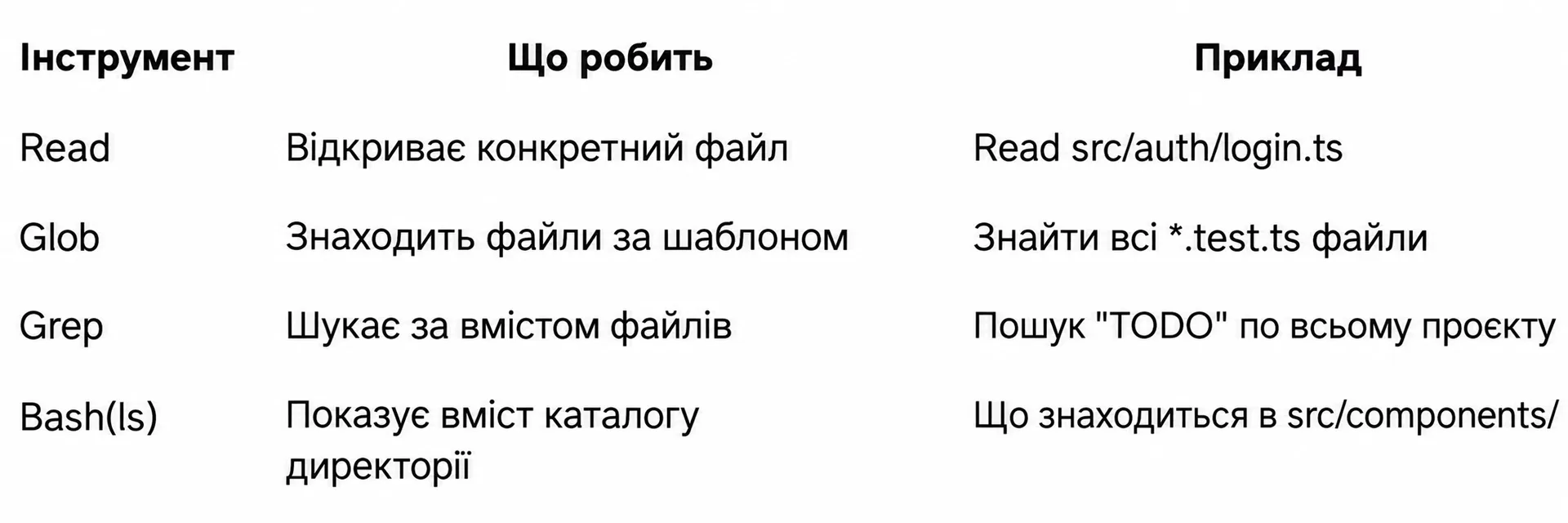 Claude Code navigation tools overview
| Tool | What It Does | Common Real-World Example |
|---|---|---|
Read | Opens and reads a specific file at an absolute or relative path | Read src/auth/login.ts to inspect component logic |
Glob | Locates files and directories matching glob patterns or extensions | Finding all **/*.config.{js,ts} or test files *.test.ts |
Grep | Executes regex and full-text substring search across file contents | Finding function call sites or leftover TODO markers project-wide |
Bash(ls) | Inspects directory hierarchy and lists module files | Discovering contents inside src/components/ |
You never need to call these tools manually. Simply state your engineering question in natural language, and Claude Code automatically coordinates the optimal toolchain.
2. Fast Onboarding in Unfamiliar Projects
When you clone a massive repository for the first time, spending hours manually opening folders and guessing module boundaries is counterproductive. Claude Code provides an accurate architectural picture in seconds.
Formulating the Architectural Discovery Prompt
Navigate to your project root, launch claude, and begin with a broad diagnostic prompt:
What the Agent Performs During Scanning
- Dependency Manifest Analysis: inspects
package.json,Cargo.toml,go.mod, orrequirements.txtto identify frameworks and core libraries. - Documentation Review: checks
README.md,ARCHITECTURE.md, or API specification files. - Directory Tree Evaluation: assesses modular boundaries (
src/api,src/components,src/services,prisma). - Summary Generation: delivers a structured report detailing key modules, entry points, and local development commands.
Claude's architectural summary is generated directly from current source files on disk, avoiding outdated documentation traps.
3. Targeted Investigation: Tracing Data Flows and Requests
Once you understand the high-level architecture, dive into specific business workflows. Claude Code excels at following execution call traces across multiple application layers.
How Claude Traces Execution Pipelines
When you issue a "trace the flow" prompt, the agent:
- Locates the initiating UI form or button via
Grep. - Identifies the corresponding API endpoint and router handler.
- Reads the route logic, checking applied middleware and authentication checks.
- Inspects database model queries and presents an end-to-end trace with line numbers.
4. Deep Pattern Search and Import Refactoring
Using built-in Grep and Glob engines, Claude Code performs surgical searches for function usages, type imports, and orphaned markers without cluttering your screen with raw terminal dumps.
Practical Search Queries
Claude groups the matches by logical domain and explains the relevance of each finding rather than simply dumping terminal lines.
5. Deconstructing and Explaining Complex Code
When dealing with dense legacy code, cryptic regular expressions, or convoluted reactive state, ask Claude for a breakdown.
Code Deconstruction Prompts
The agent doesn't merely summarize the code; it highlights subtle edge cases, concurrency hazards, and potential memory leaks.
6. Running Code Reviews and Analyzing Git Diffs
Claude Code acts as a tireless local peer reviewer prior to staging changes or opening a Pull Request.
Code Review Workflows
Interactive In-Session Reviews
If you are already inside an active Claude session, run:
Claude inspects the git delta and catches unhandled exceptions or performance regressions before your teammates review the PR.
7. Modification Tools: Edit, Write, and Bash
Understanding how Claude Code alters your local files is vital for maintaining confidence and safety. Claude uses three primary tools for changes: Edit, Write, and Bash.
The Edit Tool: Surgical Line Replacements
Edit performs precise replacements. It targets an exact block of existing code and swaps it with the proposed version, leaving surrounding code unchanged.
You always see a clear colorized diff before granting approval.
The Write Tool: Scaffolding New Modules
Write creates entirely new files from scratch or performs clean rewrites of configuration files:
The Bash Tool: Execution and Verification
Bash executes terminal commands to install dependencies, run database migrations, build the project, and execute tests:
8. Full-Stack Multi-File Changes in One Prompt
The greatest advantage of Claude Code over conversational chat interfaces is executing coherent, full-stack refactorings across diverse layers in a single request.
How Claude Coordinates Multi-File Edits
- Schema Update: updates
schema.prismausingEdit. - Migration Run: triggers
npx prisma migrate devusingBash. - Backend Route Update: adds validation rules to
src/app/api/user/route.ts. - UI Adaptation: inserts the input element inside
src/components/ProfileForm.tsx. - Type Verification: runs
npm run typecheckto guarantee cross-layer type consistency.
Each file modification prompts you for confirmation, giving you complete oversight over every change.
9. Iterative Refinement and Safe Rollbacks
Working with Claude Code is an interactive conversation. If an edit requires adjustments, you can refine it immediately without repeating the original prompt context.
Conversational Prompt Refinements
Reverting Changes When Things Go Wrong
If an applied edit produces unwanted behavior, you have two reliable recovery paths:
-
Ask Claude Directly:
textUndo the last changes you made to src/lib/validation.ts and return the file to its previous state. -
Use Git in Your Terminal:
bash# Revert a specific file git checkout -- src/lib/validation.ts # Discard all unstaged changes across the project git reset --hard HEAD
Always commit your working directory before asking Claude Code to perform large multi-file refactorings. That way, a clean git checkout brings you back instantly.
10. Engineering Best Practices and Final Checklist
Adhering to foundational engineering habits makes Claude Code an indispensable pair programmer.
Four Rules for Productive Collaboration
- One Task per Prompt: Avoid conflating distinct goals ("Add OAuth, rewrite the header styling, and delete stale tests"). Break work down into sequential, atomic prompts.
- Always Verify with Tests: After a series of edits, instruct Claude to run your test suite:
Run npm test and npm run typecheck to make sure everything compiles cleanly. - Understand the Tooling: Remember that line replacements use
Edit, new files useWrite, and environment commands useBash. Framing prompts around these mechanics produces faster results. - Maintain Context Hygiene: When finishing a major feature and switching to an unrelated topic, run
/compactor restart the session to purge unnecessary logs from the context window.
Knowledge Check
1. Which tool does Claude Code use to perform surgical line replacements without rewriting the entire file?
Answer: The
Edittool. It matches an exact block of lines and swaps them while displaying a colorized diff.
2. Why doesn't Claude Code read the entire repository into memory on startup?
Answer: To conserve token limits and keep response latency low. It uses progressive discovery via
Glob,Grep, and targetedReadcalls instead.
3. How can you quickly run a code review on a feature branch compared to main?
Answer: Run
git diff main...feature-branch | claude -p "Code review this PR"directly in your shell.
Daily Practice Checklist
- Use broad overview prompts when first exploring an unfamiliar codebase.
- Trace end-to-end workflows with "Trace the flow from UI to database" prompts.
- Run pre-commit code reviews using
claude -pon staged diffs. - Inspect the colorized diff before confirming any
Editaction. - Create a clean git commit before starting large cross-cutting refactors.
- Conclude each development session by running test and typecheck scripts via
Bash.