1. What Is Markdown: Philosophy, CommonMark, and Why It Is AI's Native Language
Markdown is a lightweight plain-text formatting syntax created by John Gruber in 2004 with an elegant vision: to write structured documents that are intuitively readable in raw form and effortlessly transpilable into valid HTML. The modern industry standard is codified under the CommonMark specification and extended via GitHub Flavored Markdown (GFM).
In conversations and tool orchestration with modern artificial intelligence (ChatGPT, Claude Code, Gemini, local Ollama models), Markdown serves as the undisputed lingua franca.
Why Large Language Models "Think" in Markdown
- Extreme Token Efficiency: Unlike verbose XML or HTML, where every tag mandates an explicit closing companion (
<p>Content</p>), Markdown relies on compact single-character glyphs or plain line breaks. - Deterministic Semantic Hierarchy: Characters like
#,-, and>provide immediate structural guidance across the model's context window without bloat. - Optimized for Streaming Output: Emitting text token-by-token without complex unclosed tags allows frontend interfaces to render rich typography dynamically in real time.
- Native Git Version Control: Because
.mdfiles are plain text, documentation and prompt iterations integrate seamlessly intogit diffreview cycles.
Markdown syntax operates across two distinct tiers: block elements (headings, paragraphs, lists, blockquotes, code blocks, tables) and inline elements (bold, italics, links, inline code). Block elements must always be delimited by blank lines.
2. Heading Hierarchy and Navigational Document Structure
Headings establish the architectural backbone of a document and drive automatic Table of Contents (TOC) generation. In Markdown, heading levels are designated by prefixing lines with hash symbols (#) from one through six.
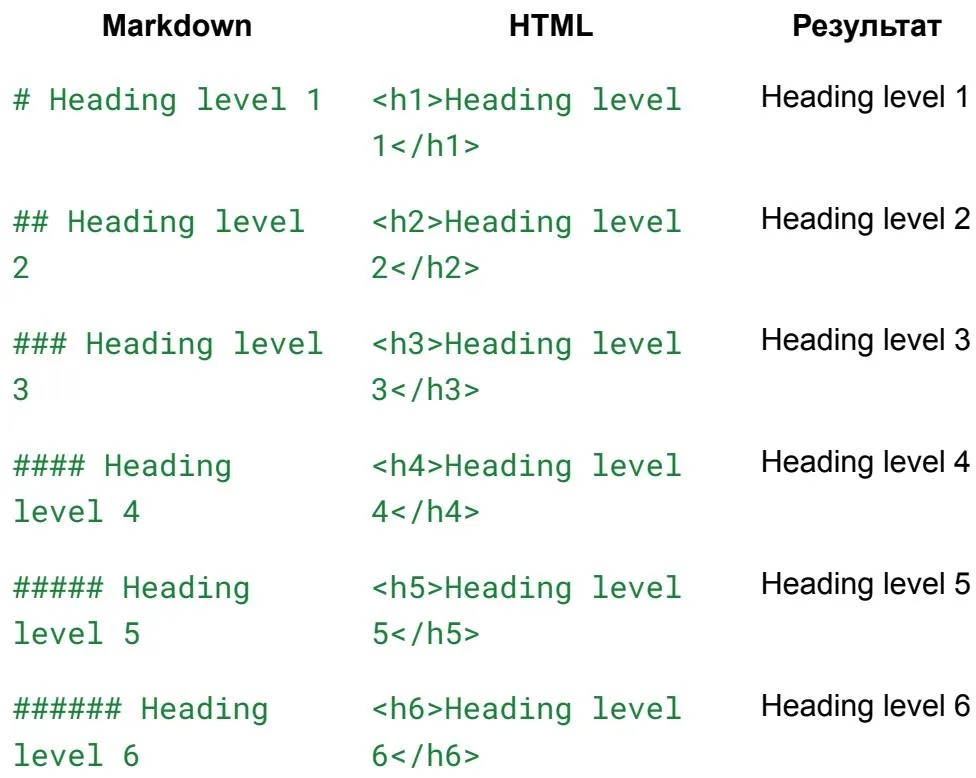 Markdown heading hierarchy and corresponding HTML tags
| Heading Level | Markdown Syntax | HTML Output | Primary Application |
|---|---|---|---|
| Level 1 | # Heading | <h1> | Document title (strictly ONE per page) |
| Level 2 | ## Heading | <h2> | Major topical sections and core modules |
| Level 3 | ### Heading | <h3> | Subsections, process steps, tool breakdowns |
| Level 4 | #### Heading | <h4> | Sub-points, technical parameters, notes |
| Level 5 | ##### Heading | <h5> | Minor contextual footnotes |
| Level 6 | ###### Heading | <h6> | Micro-specification labels |
The Mandatory Space After Hashes
Under the CommonMark standard, a single space between the # characters and the heading text is mandatory. Omitting this space causes parsers to treat the line as a social hashtag or raw plain text.
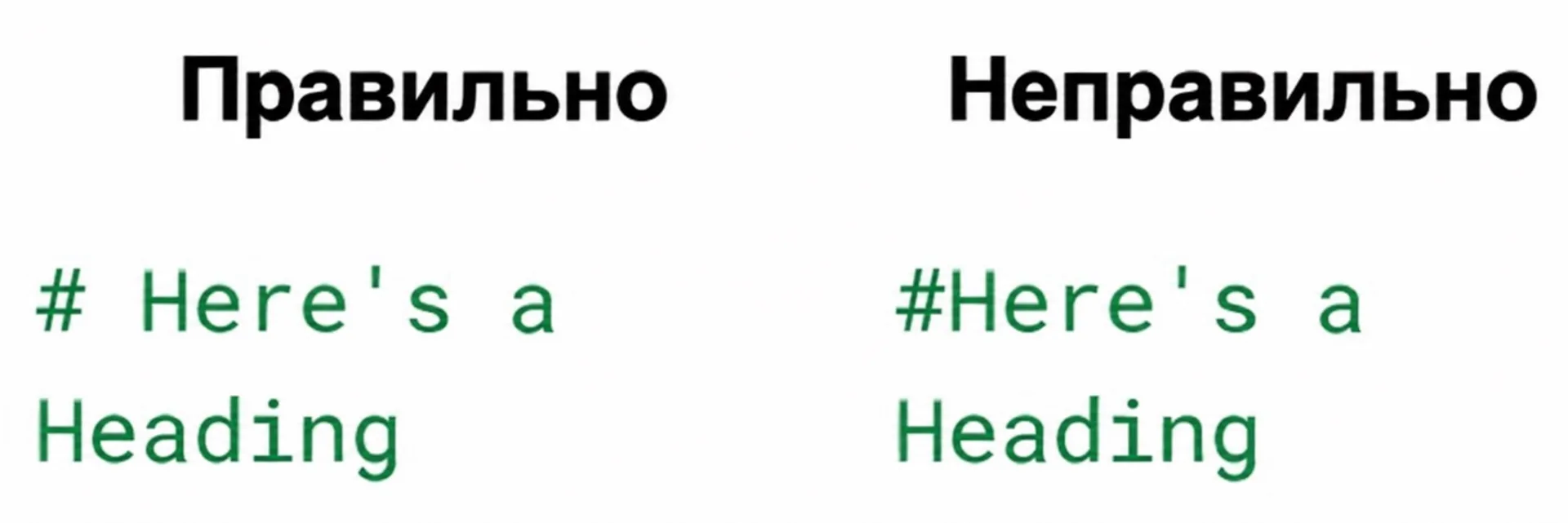 Comparison of valid and invalid heading syntax
Never insert top-level # headings into the markdown body if your page metadata (frontmatter) already defines the page title. Web renderers map the frontmatter title to <h1>; multiple H1 tags break SEO indexation and accessibility screen readers.
3. Inline Text Styling: Bold, Italic, Strikethrough, and Emphasis Rules
Inline markers allow authors to direct model and human attention to critical terminology.
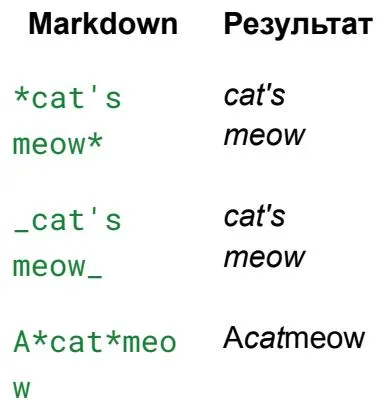 Italic text formatting syntax in Markdown
| Emphasis Style | Markdown Syntax | Rendered Appearance |
|---|---|---|
| Bold | **critical term** or __term__ | critical term |
| Italic | *emphasis* or _emphasis_ | emphasis |
| Bold Italic | ***essential directive*** | essential directive |
| Strikethrough | ~~deprecated parameter~~ | |
| Inline Code | `apiKey` | apiKey |
Essential Typographic Guidelines
- Intra-Word Emphasis: When styling partial words, always prefer asterisks (
A*cat*meow). Underscores within words are frequently disregarded by parsers to protect snake_case programming identifiers (user_auth_token). - Hard Line Breaks Without New Paragraphs: To insert a
<br>tag without starting a new block, place two trailing spaces at the end of the line or write<br>explicitly. - Hidden Author Notes: To leave annotations invisible to readers in the rendered output, use HTML comment syntax:
<!-- Internal engineering reminder -->.
4. Lists and Nested Hierarchies: Ordered, Unordered, and Task Lists
Lists organize multi-step procedures, tool catalogs, and acceptance criteria.
Ordered, Unordered, and Interactive Task Lists
Nesting Complex Blocks Inside List Items
To embed paragraphs, blockquotes, or code blocks within a list element without restarting numbering, indent every subordinate line by exactly 4 spaces:
2. Verify the compiled output in the dist/ directory.
6. Inline Code, Fenced Code Blocks, and Syntax Highlighting
Code snippets and machine instructions require monospace typography and strict isolation from lexical parsers.
Inline Code vs. Fenced Code Blocks
- Inline Code: Single backticks:
Run git status to inspect working state. - Escaping Backticks in Inline Code: Double backtick boundaries:
`npm test`. - Fenced Code Blocks: Triple backticks with explicit language identifiers for grammar highlighting.
Prompt Fencing Isolation Rule: Any prompt template, agent rule (.cursorrules, CLAUDE.md), or configuration snippet containing markdown headings (#, ##) must be enclosed within a fenced code block with a language identifier (such as markdown or text). Leaving raw headings unfenced causes external documentation parsers to leak internal prompt titles into the guide's global Table of Contents.
7. Blockquotes, GitHub Alert Callouts, and Horizontal Dividers
Blockquotes begin with a leading > character and serve to highlight key takeaways or quoted source material.
Standard and Nested Blockquotes
GitHub Alert Callouts
Modern documentation systems render stylized callout cards using specialized metadata tags:
Horizontal Dividers
Three or more hyphens (---), asterisks (***), or underscores (___) on an isolated line produce a horizontal thematic divider:
8. Escaping Special Characters and Safe Inline HTML
When you need to render reserved Markdown syntax symbols as literal characters, prepend a backslash (\).
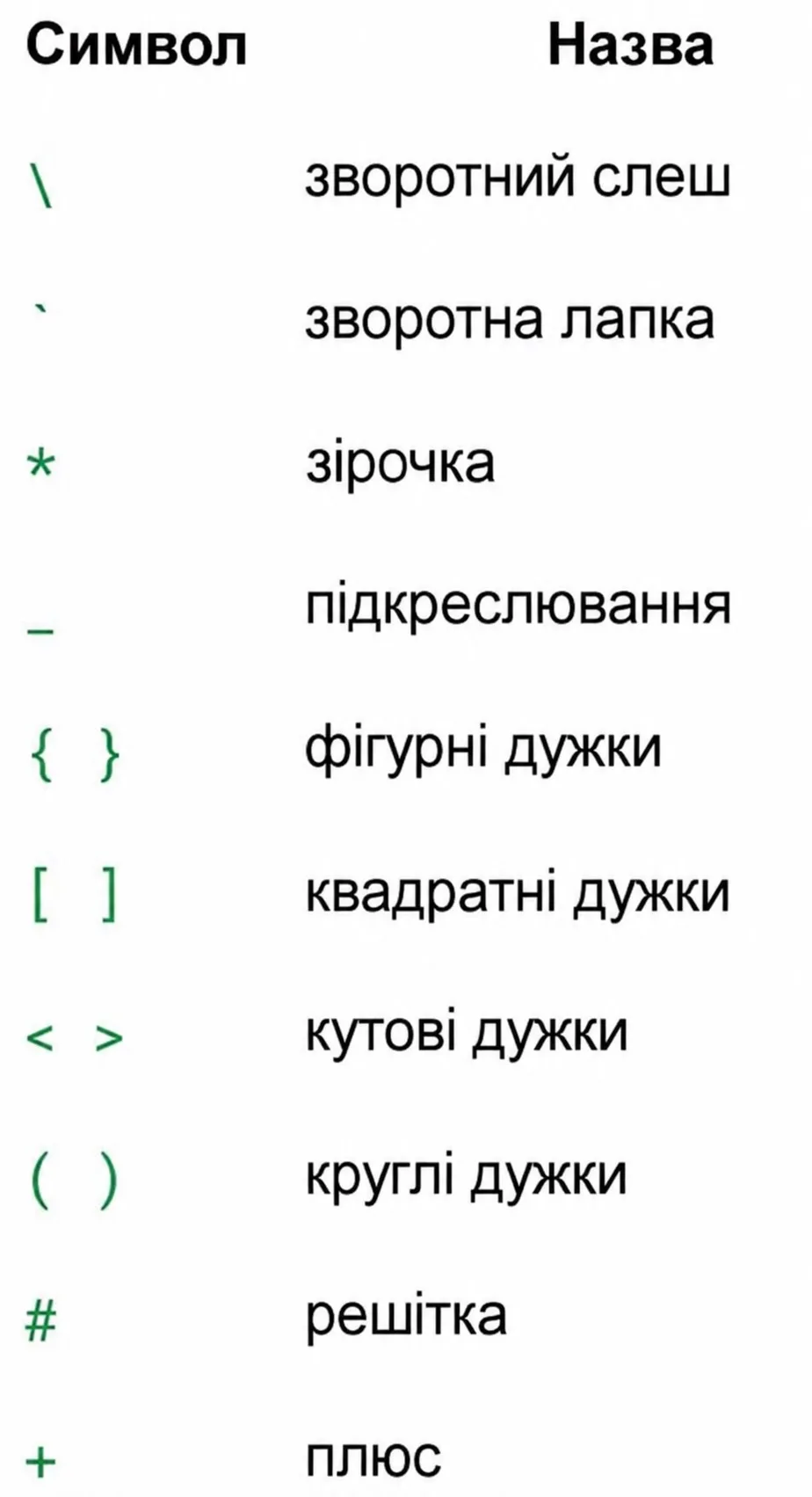 Special Markdown characters that can be escaped with a backslash
Reserved Characters Escaping Reference
| Glyph | Character Name | Escaped Syntax | Rendered Literal |
|---|---|---|---|
\ | Backslash | \\ | \ |
` | Backtick | \` | ` |
* | Asterisk | \*not italic\* | *not italic* |
_ | Underscore | \_not bold\_ | _not bold_ |
# | Hash Symbol | \# Not a heading | # Not a heading |
[ ] | Square Brackets | \[Not a link\] | [Not a link] |
! | Exclamation Mark | \!Not an image | !Not an image |
Inline HTML Hygiene and Security
While basic HTML is supported by many markdown engines, observe these constraints:
- Use
<br>for deliberate line breaks within table cells. - Use
<u>for underlined text. - Block-level HTML tags (
<div>,<table>) must be separated by blank lines; Markdown parsing is strictly disabled inside raw HTML blocks.
9. GitHub Flavored Markdown (GFM) Tables and Mermaid Diagrams
Tabular data matrices enable concise side-by-side technical evaluation.
GFM Table Alignment Syntax
:---— Left-aligned column.:---:— Centered column.---:— Right-aligned column (optimal for currency and numerical metrics).
Visual Architecture Diagrams via Mermaid
Replace bulky static raster screenshots with maintainable, text-driven Mermaid diagrams:
10. Markdown for AI Agents: CLAUDE.md, System Prompts, and Quality Checklist
In modern AI agent workflows (Claude Code, Cursor, Windsurf, Devin), Markdown serves as the system control plane.
Project Governance Files (CLAUDE.md / .cursorrules)
Autonomous agents inspect CLAUDE.md prior to executing commands. Structuring this file with clear Markdown syntax ensures reliable agent compliance:
Master Prompt for Synthesizing Clean Markdown
Pre-Flight Markdown Quality Checklist
- Body text contains zero
#tags (H1 is derived solely from frontmatter title). - Top-level sections are numbered sequentially (
## 1.,## 2.). - Every
#prefix is followed by an intentional whitespace. - Prompts and configuration blocks are shielded within fenced code blocks.
- Special characters in hyperlink targets are percent-encoded.
- Tables conform to GFM standards without missing column delimiters.
- All embedded images feature descriptive alt text for accessibility.