1. What Is JSON and Why It Became the Industry Standard
JSON (JavaScript Object Notation) is the universal standard for exchanging structured data between web servers, mobile clients, databases, and modern AI agents.
When software systems communicate, exchanging unformatted plain text is unreliable and inefficient:
"Elena Kovalchuk, 29 years old, Kyiv, premium subscription active, skills: Python, SQL."
While a human can interpret that sentence effortlessly, an algorithm must expend considerable processing power on heuristic entity extraction. In JSON, the exact same information is represented deterministically:
Any parser in any modern language (JavaScript, Python, Go, Rust) can instantly look up the "city" key and retrieve "Kyiv" without ambiguity.
Why JSON Is Language-Agnostic
Despite containing "JavaScript" in its name, JSON is a language-independent text format defined by RFC 8259. It operates as the standard communication medium across operating systems and microservices via the application/json MIME type.
2. Anatomy of JSON: Objects, Arrays, and Primitive Values
All JSON documents are built from two structural containers (objects and arrays) and six fundamental value types.
Object (JSON Object)
An object is an unordered collection of key: value pairs wrapped in curly braces {}. Keys must always be double-quoted strings.
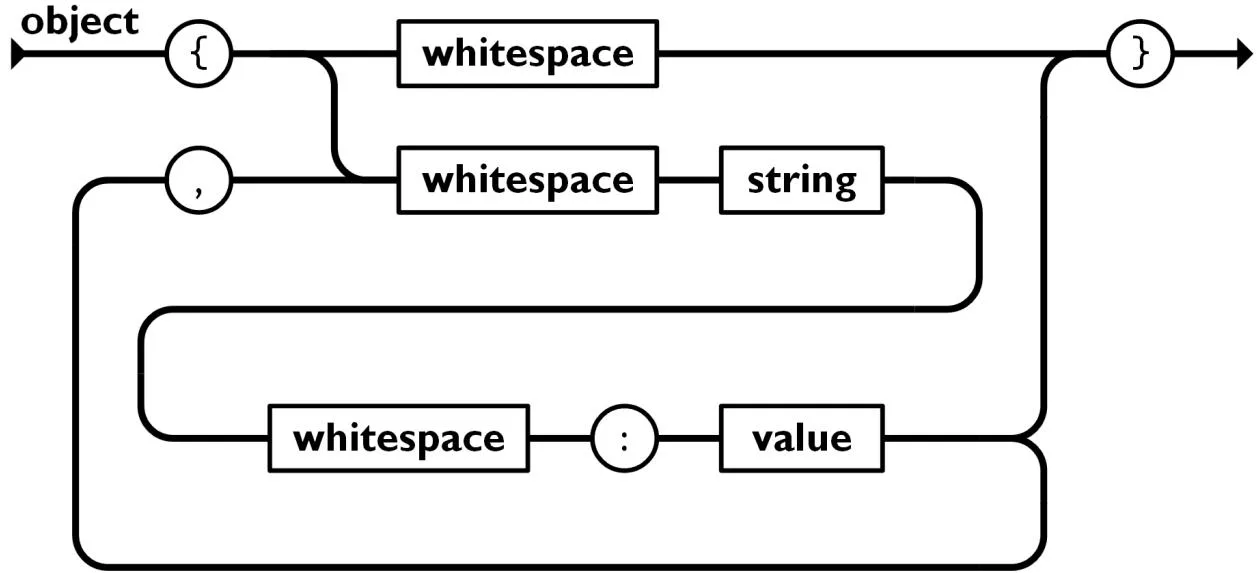 JSON Object syntax railroad diagram
Array (JSON Array)
An array is an ordered sequence of values wrapped in square brackets []. Elements are zero-indexed and can contain any valid JSON type.
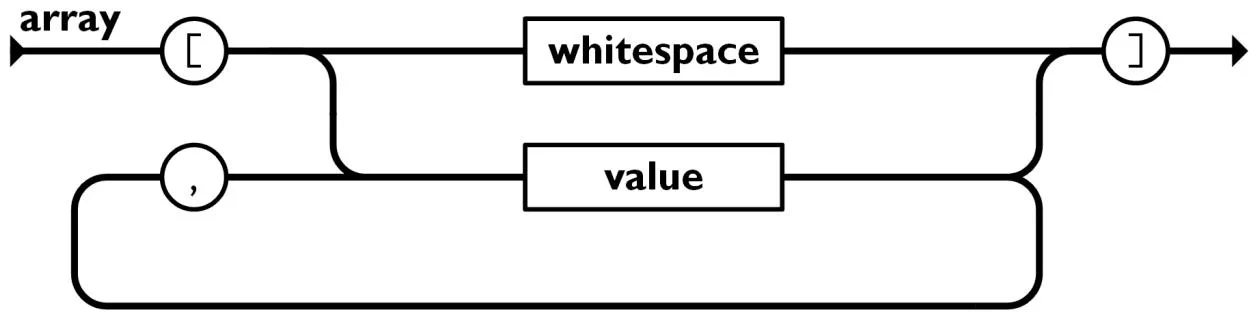 JSON Array syntax railroad diagram
Allowed Value Types
JSON strictly supports six primitive value types:
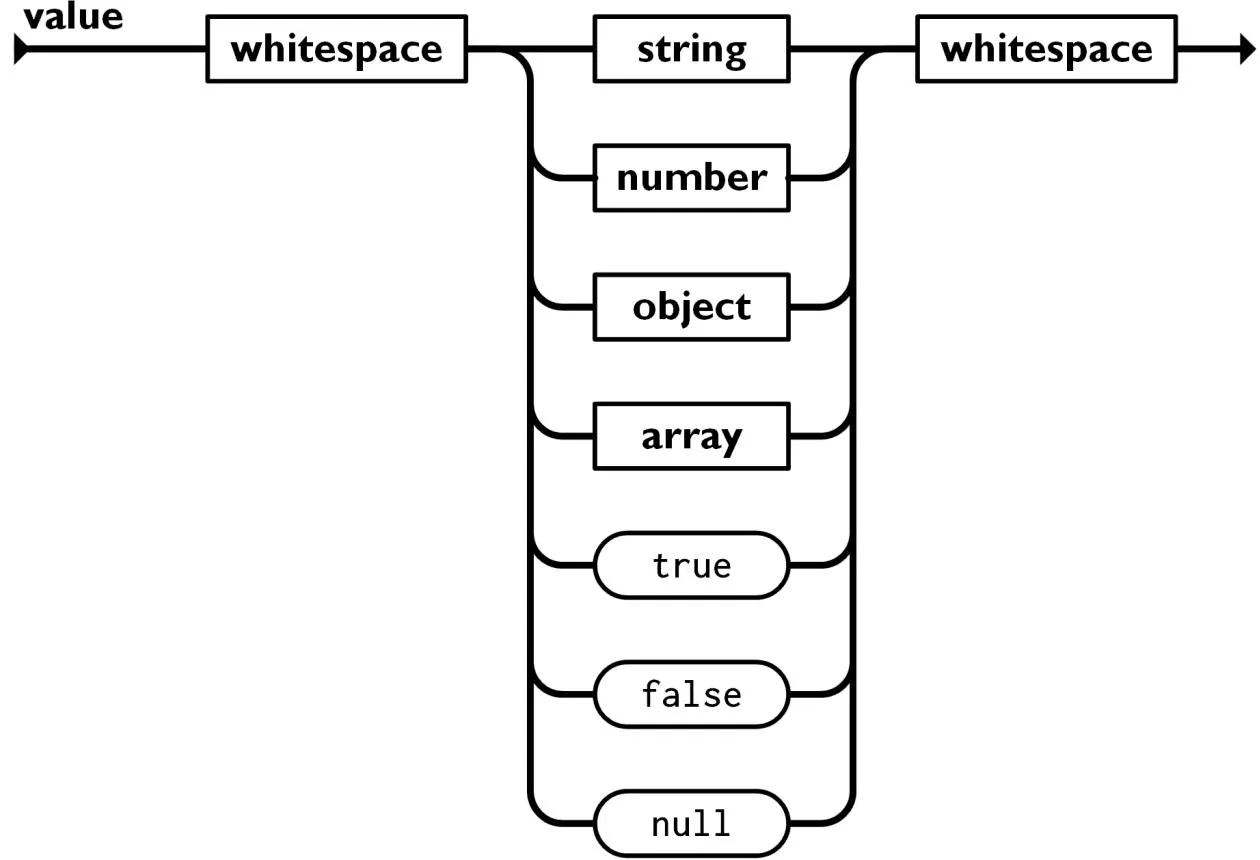 Allowed value types in JSON specification
| Value Type | Syntax Rules and Description | Example |
|---|---|---|
| String | Sequence of Unicode characters wrapped in double quotes | "Hello, World!" |
| Number | Integer or floating-point number (no hex, no trailing dots) | 42, -12.5, 1.5e3 |
| Boolean | Strictly lowercase literal: true or false | true, false |
| Null | Literal representing the intentional absence of a value | null |
| Object | Nested key-value container | {"nested": true} |
| Array | Nested ordered list of values | [1, 2, 3] |
3. Strict Syntax Rules and Common Pitfalls
JSON is significantly more rigid than JavaScript or Python syntax. A single misplaced comma or quote invalidates the entire payload.
Five Core Syntax Principles
- Double Quotes Exclusively: All keys and strings must use
"double quotes". Single quotes ('text') cause fatal parser errors. - No Trailing Commas: Commas after the last key-value pair or array element are strictly illegal.
- Colons for Key-Value Delimitation: A colon
:is the only valid separator between a key and its value. - Zero Comments Allowed: JSON does not support
//or/* */comments. Explanatory metadata must be included as regular fields (e.g."_comment": "Notes"). - Restricted Runtime Types: JSON cannot serialize
undefined,NaN,Infinity, functions, or Date objects directly.
Valid vs. Invalid JSON Comparison
4. Key Differences Between JSON and JavaScript Objects
Beginners often conflate JavaScript object literals with JSON. However, they represent distinct concepts in runtime architecture.
Direct Feature Comparison
| Attribute | JavaScript Object Literal | JSON Specification |
|---|---|---|
| Format | Dynamic in-memory data structure | Serialized text string |
| Key Constraints | Identifiers can be unquoted or Symbols | Must strictly be double-quoted strings |
| Type Support | Functions, Date, Map, Set, undefined | Exactly 6 data types (string, number, bool, null, obj, arr) |
| Comments | Fully supported (// and /* */) | Prohibited |
| Trailing Commas | Allowed in modern ECMAScript | Prohibited |
5. Navigating and Querying Nested Data Structures
In real-world applications, API responses feature deep hierarchies. Accessing nested values requires dot notation for objects and index notation ([]) for arrays.
Complex Data Sample
Element Lookup Patterns
order.orderId$\rightarrow$ evaluates to"ORD-94821"order.customer.fullName$\rightarrow$ evaluates to"Taras Shevchenko"order.customer.contacts.phones[0]$\rightarrow$ evaluates to"+380501112233"order.items[1].price$\rightarrow$ evaluates to120
In modern JavaScript and TypeScript, always use optional chaining (order?.customer?.contacts?.email) to prevent unhandled TypeError: Cannot read properties of undefined exceptions.
6. JSON in REST APIs: Requests, Responses, and Headers
Practically all modern web services rely on JSON as the payload transport mechanism over HTTP.
Essential HTTP Headers
Content-Type: application/json: notifies the server or client that the request or response body contains a serialized JSON payload.Accept: application/json: informs the backend that the client expects the response strictly in JSON format (rather than XML or HTML).
7. Serialization and Deserialization: parse and stringify
Translating in-memory objects into raw text is called Serialization, while converting text back into an object model is Deserialization.
8. Syntax Error Diagnostics and Validation
When input contains invalid syntax, invoking JSON.parse() throws an unhandled SyntaxError, which can crash an entire thread if uncontained.
Quick Diagnostic Checklist
- Are all opening brackets and braces matched with corresponding
}and]? - Are all keys and string values enclosed in double quotes
""? - Is there any trailing comma before a closing bracket?
- Are forbidden values (
undefined,NaN, comments) eliminated? - Are nested quotes properly escaped:
"quote": "Word in \"quotes\""?
9. JSON Schema: Contract Enforcement and Data Validation
A document can be syntactically valid JSON while failing critical business domain requirements (e.g. an age field containing "twenty" instead of an integer).
JSON Schema is the international specification for describing and validating JSON data structures.
Validation libraries (such as Ajv in Node.js or jsonschema in Python) automatically verify incoming payloads against this contract before touching business logic.
10. Structured Outputs for LLMs, Function Calling, and AI Agents
In autonomous agent development, unstructured prose is being superseded by Structured Outputs.
AI agents (such as Claude Code, OpenAI Function Calling, and LangChain) communicate with tools using JSON parameters:
Best Practices for Enforcing JSON from LLMs
- Provide Explicit Schemas: Supply a strict TypeScript interface or JSON Schema in the system prompt.
- Request Pure Output: Instruct the model: "Return ONLY a raw valid JSON object. Do not wrap in markdown fences or include conversational commentary."
- Use API Structured Output Modes: Utilize provider-level JSON mode features (such as Anthropic Tool Use or OpenAI Structured Outputs) to enforce token-level grammar constraints.
11. Format Comparison: JSON vs. YAML vs. XML vs. TOML
| Format | Human Readability | Comment Support | Syntactic Overhead | Primary Industry Use Case |
|---|---|---|---|---|
| JSON | Moderate / High | No | Minimal | Web APIs, client-server transport, AI tool calling |
| YAML | Very High | Yes | Zero (indentation-based) | CI/CD pipelines (GitHub Actions, Kubernetes manifests) |
| TOML | Very High | Yes | Low | Application configs (Cargo, pyproject.toml) |
| XML | Low | Yes | High (verbose tags) | Legacy enterprise services, SOAP, SVG graphics |
12. Hands-on Workshop, Self-Assessment, and Final Checklist
Reinforce your understanding by walking through a complete API fetch, parse, and query cycle.
Complete Retrieval and Consumption Workflow
Review Questions
1. What error occurs when single quotes are used to wrap strings in a JSON file?
Answer: A parser error (
SyntaxError: Unexpected token ' in JSON). The JSON specification mandates double quotes""exclusively.
2. Why are trailing commas forbidden after the last element of an object or array?
Answer: The RFC 8259 standard forbids trailing commas. Parsers expect a subsequent key-value pair following a comma; encountering a closing brace
}causes a syntax violation.
3. What is the role of JSON Schema in distributed web services?
Answer: To enforce business domain contracts and type invariants (verifying mandatory fields, numeric ranges, and email formats) beyond basic syntactic correctness.
JSON Production Readiness Checklist
- All keys and string values are enclosed in standard double quotes
"". - Verified that no trailing commas exist prior to
}or]. - Confirmed that all code comments have been purged from the document.
- Configured
Content-Type: application/jsonheaders on all network transmissions. - Wrapped all
JSON.parse()calls intry/catchdefensive blocks. - Enforced strict
JSON Schemavalidation contracts for critical API and AI payloads.