1. What Are Agent Skills: Architecture and Cross-Agent Compatibility
Agent Skills are modular packages of procedural engineering instructions that equip AI agents with specialized operational capabilities. Instead of spending time explaining conventions and guidelines during every new chat session, a developer injects a skill. The agent immediately acquires deterministic execution workflows, validated terminal commands, and documented pitfall mitigations.
Every skill is structured as a SKILL.md file or a directory containing referenced guidelines. Thanks to an open specification, the exact same skill operates seamlessly across modern autonomous runtimes: Anthropic Claude Code, OpenAI Codex, Cursor, Windsurf, and custom open-source CLI agents.
Key Engineering Benefits of Standardized Skills
- Zero Workflow Hallucinations: The agent follows deterministic paths rather than improvising repository architecture.
- Context Economy: Full instructions load into the active prompt window only when the frontmatter trigger conditions match the developer's request.
- Universal Portability: A skill authored once operates consistently across CLI-first environments (Claude Code, Codex) and IDE extensions.
2. Global Best Agent Skills Ranking: Sources and Methodology
To help engineers navigate an exponentially expanding catalog of community contributions, the Best Agent Skills analytical registry tracks and evaluates over 10,000 public skill repositories on a daily cadence.
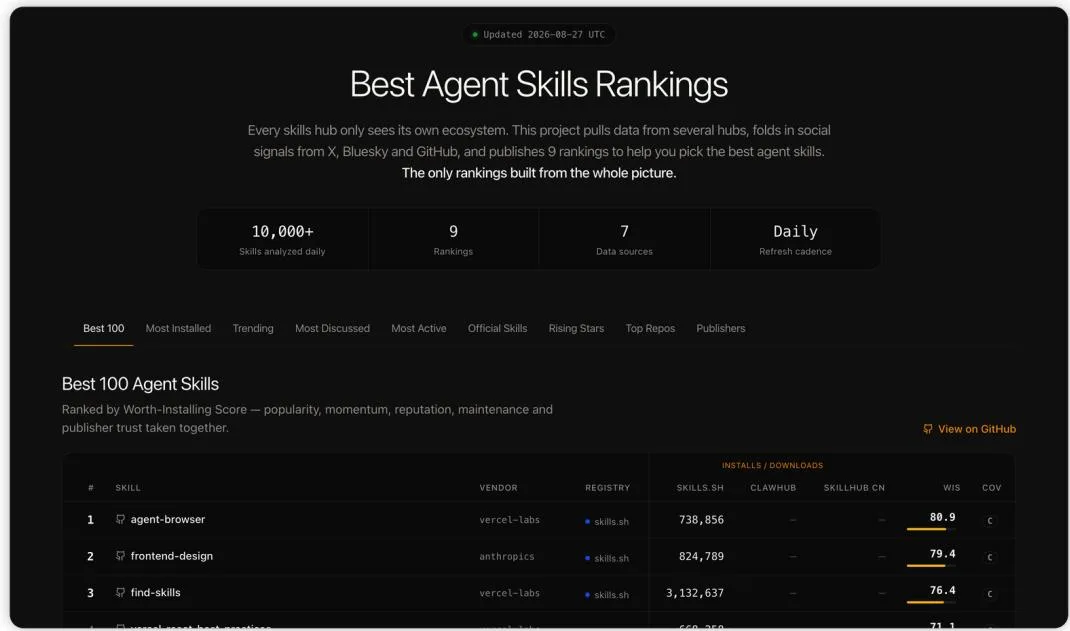 Analytical dashboard of the global Best Agent Skills registry
The ranking engine synthesizes telemetry from multiple sources: public registries such as skills.sh, ClawHub, and Tencent SkillHub, GitHub activity, and social discourse signals across X, Hacker News, and Bluesky.
Ranking Categories and Evaluation Metrics
| Ranking Track | Underlying Algorithm | Target Audience |
|---|---|---|
| Best 100 | Composite Worth-Installing Score (momentum, publisher reputation, maintenance) | Primary index for reliable, battle-tested production utilities |
| Top Installs | Absolute count of verified package downloads across registries | Standard industry benchmarks measured by developer adoption |
| Trending (7d) | Highest rate of installation acceleration over the past 7 days | Discovering breakout engineering tools gaining early traction |
| Most Active | Commit frequency, documentation freshness, and issue resolution velocity | Identifying packages guaranteed to remain actively maintained |
| Official 100 | Curated repositories from verified vendors (Anthropic, Vercel, Microsoft) | Corporate and compliant development environments |
| Rising Stars | Packages created within the last 30 days exhibiting sharp growth | Early access to experimental development patterns |
High install counts do not automatically indicate that a given tool is necessary for your workflow. Skills should be evaluated strictly against your active technology stack and immediate operational bottlenecks.
3. Core Starter Toolkit: Discovery, Browser Automation, and Skill Generation
Three foundational utilities consistently dominate the top tier of global rankings. Because they are technology-agnostic, they integrate cleanly into any developer environment.
find-skills: Autonomous Solution Discovery
- Standing: #2 in Best 100, #1 in total installations on
skills.sh. - Functionality: Enables an agent to search, review, and install specialized community skills autonomously based on developer intent during conversation.
- Typical Use Case: You ask the agent to "configure a ClickHouse migration pipeline," and it automatically retrieves and installs a verified skill for that specific database engine.
agent-browser: Full Web Interface Automation
- Standing: #1 in Best 100, leading discussion rankings.
- Functionality: Embeds Playwright and Puppeteer runtimes, granting the agent full access to navigate complex SPAs, bypass authentication flows, test responsive layouts, and extract dynamic DOM content.
- Typical Use Case: The agent boots a staging URL, validates form interactions, captures visual diffs, and inspects API network telemetry.
skill-creator: Autonomous Instruction Authoring
- Standing: Top 10 in Official 100 (authored by Anthropic).
- Functionality: An interactive design assistant that packages repeating manual engineering workflows into clean, standardized
SKILL.mdspecifications following prompt engineering best practices. - Typical Use Case: Converting a manual release runbook into a repeatable, automated project skill.
4. Code Engineering Skills: TDD, Diagnostics, and Code Review
This suite addresses daily backend and full-stack software development workflows, dramatically reducing debugging cycles and enforcing architectural consistency.
Engineering Skills Comparison
| Skill Name | Mechanism & Workflow | Ideal Operational Moment |
|---|---|---|
diagnosing-bugs | Constructs hypothesis trees, isolates regressions, inserts temporary tracing, and identifies root causes | Elusive runtime errors and deep regression debugging |
tdd | Enforces the rigorous Red → Green → Refactor loop before authoring application logic | Implementing new business domains and critical API endpoints |
code-review | Dual-phase verification: repository style guide compliance + functional acceptance criteria | Mandatory pre-flight check before submitting a Pull Request |
improve-codebase-architecture | Audits module coupling, circular dependencies, and architectural drift | Legacy module refactoring and system scaling |
Pairing tdd with code-review establishes a reliable safety net, preventing autonomous agents from producing code that passes superficial manual checks while silently breaking adjacent modules.
5. Frontend and UI Engineering: Crafting Distinctive Interfaces Without Generic Slop
In frontend engineering, official tools from Anthropic and Vercel Labs prevent a common AI pitfall: monotonous, repetitive aesthetics that feel like generic templates.
frontend-design
- Purpose: Crafts distinct, expressive landing pages, dashboards, and client components. It explicitly prohibits generic AI design defaults (e.g., three identical cards with purple gradients) in favor of strong typographic hierarchy and custom layout grids.
web-design-guidelines
- Purpose: Audits generated markup against modern Web Interface Guidelines, checking WCAG compliance, contrast ratios, mobile touch target sizes, accessible keyboard focus rings, and font loading hygiene.
vercel-react-best-practices
- Purpose: Enforces performance standards for React 19 and Next.js App Router, optimizing React Server Components, eliminating unnecessary re-renders, minimizing client bundle footprints, and tuning streaming SSR.
vercel-composition-patterns
- Purpose: Drives structural component refactoring, steering components away from monolithic architectures burdened with 20+ boolean props toward composable patterns with slots and compound children.
6. Stack-Specific Specialized Skills: Cloud and Databases
High-ranking skills focused on specific technologies provide substantial leverage only when your repository directly uses those dependencies. Avoid installing them speculatively.
Prevent Context Window Contamination: If your service is built on Go or Python, installing vercel-react-best-practices or azure-storage will needlessly consume tokens and introduce irrelevant constraints.
7. Practical Installation via the skills CLI Package Manager
The universal skills package manager installs community and enterprise skill bundles directly from GitHub via a single terminal command.
8. Selection Methodology: Protecting the Context Window from Bloat
A frequent mistake among engineers is installing dozens of skills at once. Overloading the agent causes instruction drift, inflates prompt token overhead, and noticeably slows generation speed.
Core Principles of Skill Hygiene
- Maintain 5–7 Active Skills per Repository: Restrict your active catalog to tools relevant to your current sprint.
- Prioritize Verified Publishers: Begin evaluations within
Official 100or established corporate publishers (Anthropic, Vercel, Microsoft). - Default to Project-Local Scope: Keep installations isolated within project directories to prevent cross-stack interference.
- Prune Ephemeral Skills: When a milestone concludes (such as a database migration), remove transient skills from your workspace.
9. Recommended Starter Pack and Implementation Checklist
For a balanced, high-impact setup that covers the vast majority of engineering tasks without context clutter, begin with this curated baseline:
The Essential Baseline Pack
- System & Discovery:
find-skills(navigation) andskill-creator(rule generation). - Engineering Rigor:
diagnosing-bugs(incident triage) andtdd(regression prevention). - UI Quality (Optional):
frontend-designandweb-design-guidelines.
Implementation Checklist
- Installed
find-skillsfor on-demand tool retrieval. - Configured quality guardrails (
diagnosing-bugsandcode-review). - Audited workspace to remove unused stack-specific skills.
- Targeted installation to your primary agent runtime (Claude Code or Codex).
- Verified prompt latency and context window consumption.