1. Agent Architecture and Selection: Hermes, OpenClaw, or Paperclip
In the 2026 autonomous agent landscape, no single tool fits every operational scenario. Three prominent open-source systems—Hermes, OpenClaw, and Paperclip—embody fundamentally different architectural paradigms. Rather than competing directly, they often run concurrently within production environments on a single server.
Agent Platform Comparison Matrix
| Dimension | Hermes Agent | OpenClaw | Paperclip |
|---|---|---|---|
| Primary Purpose | Continuous learning researcher & specialist | Omnichannel autonomous employee | Multi-agent team orchestrator (5+ agents) |
| Memory Mechanics | Dynamic: updates MEMORY.md, USER.md, and skills every 10 steps | Static: behavior hardcoded in SOUL.md | Project-based: shared board state and hierarchy |
| Interface Channels | 6 core adapters (CLI, Telegram, Discord, WhatsApp, etc.) | 50+ integrations (Teams, Slack, iMessage, Signal) | Manages external agents via runtime adapters |
| Learning Capability | High: automatically compiles workflows into skills | None: requires manual rule updates | Indirect: coordinates subordinate workers |
| Threshold of Utility | High ROI starting from 1 single task | High ROI for multi-platform communication | Requires 5+ coordinated agents to justify setup |
All three frameworks operate on isolated network ports and separate runtimes. You can reliably run Hermes as a research engine, OpenClaw as a messaging gateway, and Paperclip as a department orchestrator on the exact same host.
2. Hardware Requirements and Infrastructure Setup
While Hermes can function as a lightweight local CLI utility, a full-fledged autonomous deployment (featuring headless browser automation, background gateways, and vector memory retrieval) demands a robust server environment.
Recommended VPS Specifications
- Compute: Minimum 2 vCPU cores (essential for concurrent scraping and token parsing).
- Memory: 8 GB RAM (provides adequate headroom for Playwright browser sessions and Docker processes).
- Storage: 100 GB NVMe SSD (accommodates cached artifacts, logs, and container layers).
- Operating System: Ubuntu 24.04 LTS or Debian 12 with pre-configured Docker Engine.
Essential External Accounts
- Docker-Enabled Cloud Host: Hetzner, DigitalOcean, Vultr, or any standard KVM VPS provider.
- Unified LLM Gateway (OpenRouter): Instead of provisioning separate API tokens across Anthropic, OpenAI, and Moonshot, rely on OpenRouter. A single API key unlocks access to 200+ foundation models with pooled credits and dynamic model routing.
3. Step-by-Step Hermes VPS Deployment via Docker
The recommended and most reproducible method for deploying Hermes is the official containerized build provided by Nous Research, preventing local Python environment contamination.
Step 1. Establishing SSH Access
Once your cloud provider completes provisioning, open your local terminal and log in as root:
Step 2. Verifying the Container Environment
Confirm that the Hermes Docker container is healthy and running:
You should see the nousresearch/hermes-agent:latest image listed. Navigate to the deployment folder and enter the interactive bash shell:
Step 3. Running the Interactive Setup Wizard
Initiate the guided configuration walkthrough:
The wizard prompts you through four straightforward stages:
- Select LLM Provider: Choose
OpenRouter. - Provide API Secret: Paste your OpenRouter API key (
sk-or-v1-...). - Select Default Model: Pick any provisional model (we will optimize multi-model role assignments in the next section).
- Configure Messaging Adapters: Optionally enable Telegram or Discord (this can safely be skipped for now).
Step 4. Conducting the Initial CLI Test
Verify that the runtime environment functions as intended:
Once the Hermes splash screen appears, issue a basic filesystem verification query:
If Hermes outputs the folder directory listing, tool calling is operational. If an unexpected error occurs, execute the built-in diagnostic suite:
4. Model Configuration and OpenRouter Budget Optimization
By default, Hermes directs requests toward top-tier frontier models like Claude Opus. Operating in this default state introduces unnecessary financial overhead:
The Monolithic Model Cost Trap: Employing Opus-class models across every operational phase (initial planning, shell execution, output aggregation) costs $0.50–$2.00 per session. Across 90 monthly sessions, this aggregates to $45–$180 in raw API consumption alone.
Multi-Model Role Specialization Architecture
By distributing agent responsibilities across task-specialized models, monthly expenses drop to $12–$22 without compromising analytical rigor.
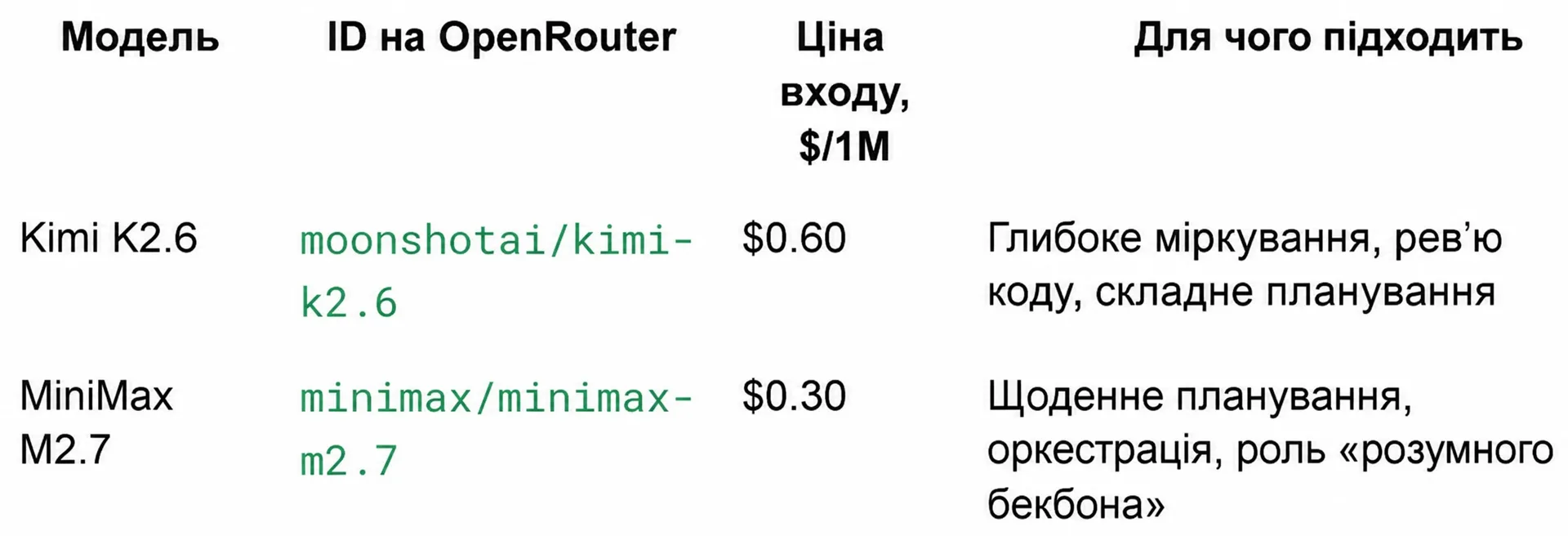 Comparative pricing and performance benchmarks for Hermes Agent
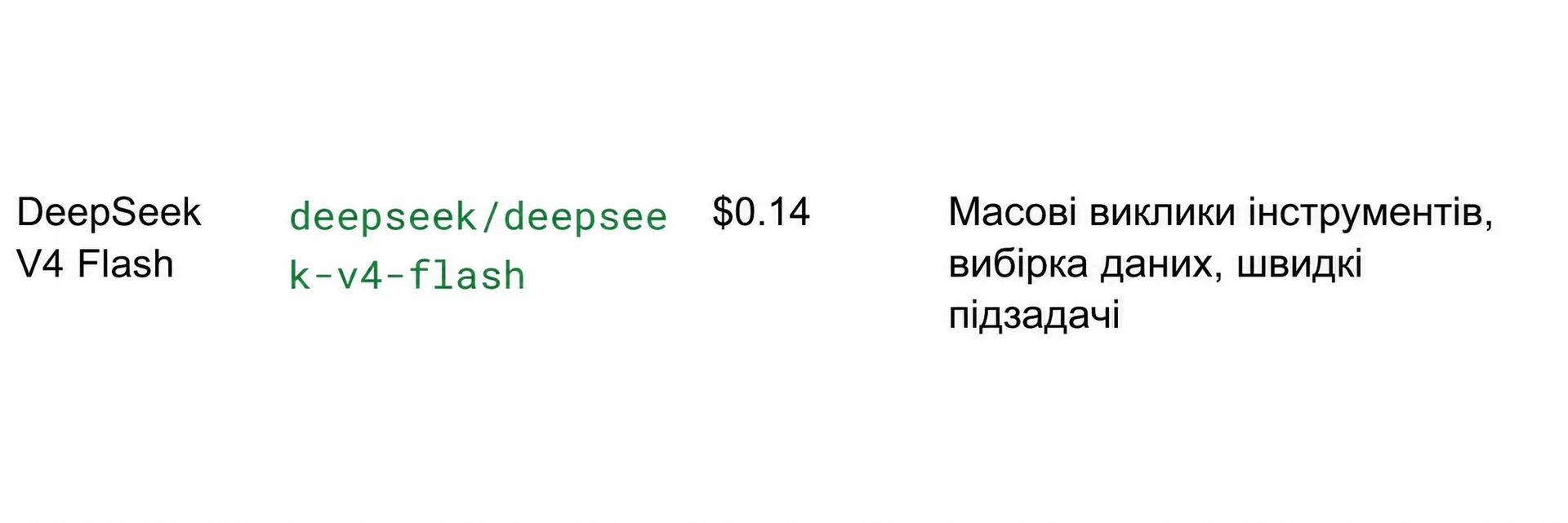 High-throughput cost-effective models for bulk tool calling
Recommended Model Strategy Matrix
| Agent Role | Model Choice | OpenRouter Identifier | Input Cost ($/1M) | Core Responsibility |
|---|---|---|---|---|
| Planner & Backbone | MiniMax M2.7 | minimax/minimax-m2.7 | $0.30 | Session orchestration, intent decomposition, workflows |
| Reviewer & Reasoning | Kimi K2.6 | moonshotai/kimi-k2.6 | $0.60 | Deep reasoning, automated code review, edge-case checks |
| Fast Tool Executor | DeepSeek V4 Flash | deepseek/deepseek-v4-flash | $0.14 | Rapid terminal operations, bulk scraping, data parsing |
| Vision Subsystem | Gemma 4 26B IT | google/gemma-4-26b-a4b-it:free | Free | Screenshot interpretation, visual asset evaluation |
YAML Model Router Configuration
Open the agent settings file:
Populate the configuration with the structured role hierarchy below:
To persist the API key globally via the CLI:
Enforcing Budget Ceilings: Always configure an explicit hard monthly spending limit in your OpenRouter account (Settings → Credits → Monthly limit). Setting an initial limit of $15/month guarantees that recursive loops or runaway scraping routines cannot drain your credit balance.
5. Security Hardening and Messaging Gateway Integration
Connecting Hermes to messaging services enables remote mobile command execution via Telegram or Discord.
Strict Terminal Access Warning: Any user who communicates with your Hermes bot possesses unrestricted shell execution privileges within the container. Never deploy a publicly accessible bot without configuring explicit user ID whitelisting!
Telegram Gateway Setup Procedure
Start and monitor the gateway background service:
6. Practical Workflow: Self-Learning and Reusable Skill Compounding
The distinguishing advantage of Hermes compared to stateless API calls is knowledge compounding. The agent records multi-step operational discoveries directly into ~/.hermes/skills/.
Demonstrating Autonomous Skill Generation
Provide Hermes with an exploratory research instruction:
Execution and Persistence Lifecycle
- Execution: Hermes conducts automated web lookups, aggregates discussion threads, and filters marketing fluff.
- Formatting: It outputs a concise 9-bullet summary respecting your defined voice parameters.
- Skill Compilation: The agent writes the procedural routine to
~/.hermes/skills/reddit-trending-frameworks.md.
Verify that the skill document has been written to disk:
Zero-Shot Execution on New Target Domains
To repeat this task on a different target community, you no longer need to write a lengthy prompt or redefine stylistic parameters:
Hermes immediately executes the saved procedure, requiring fewer token round-trips and executing measurably faster than the exploratory run.
7. Diagnostics and Troubleshooting
When launching Hermes on a fresh VPS, environment discrepancies may occasionally interrupt initialization.
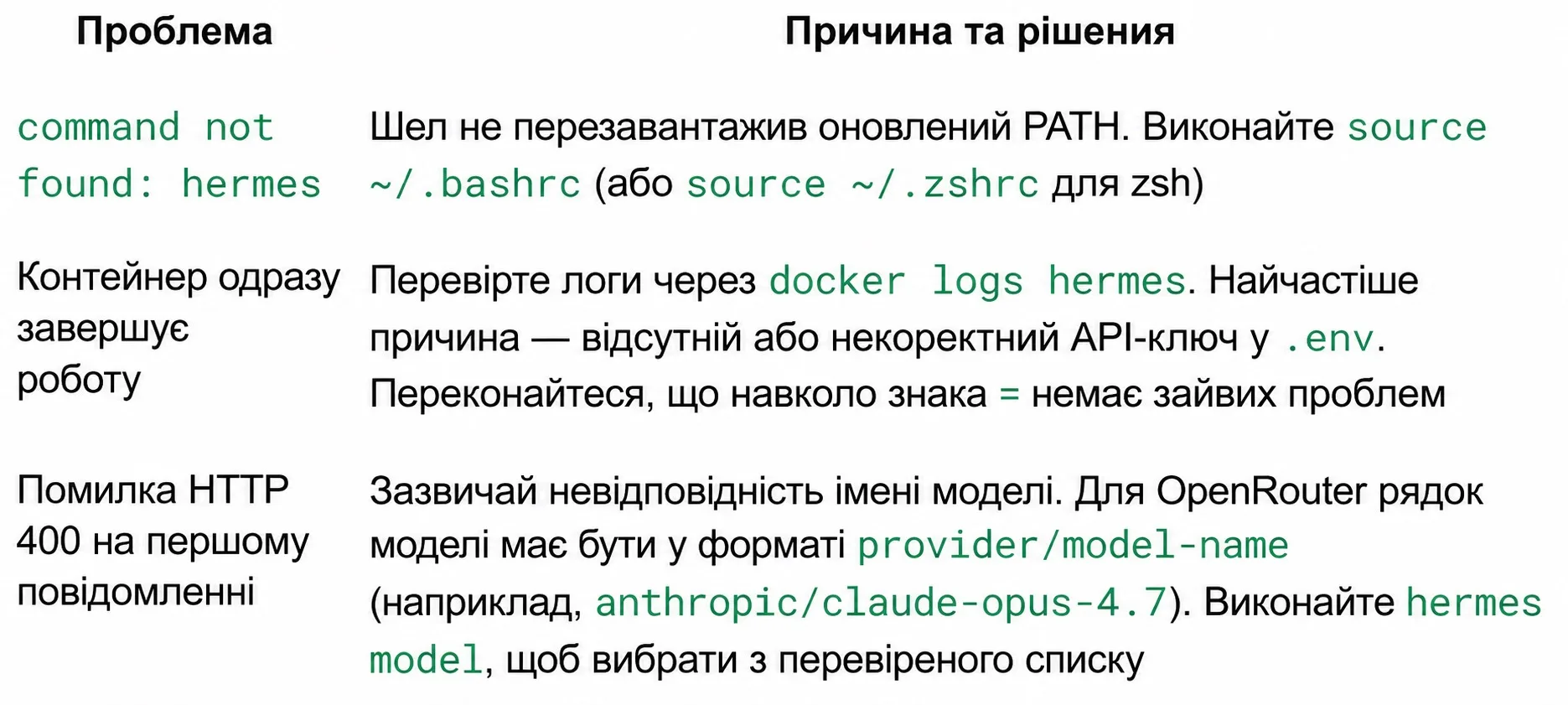 Visual troubleshooting guide for common Hermes operational errors
Troubleshooting Matrix
| Error Manifestation | Root Cause | Verified Resolution |
|---|---|---|
command not found: hermes | System shell did not reload modified environment paths. | Execute source ~/.bashrc (or source ~/.zshrc for zsh). |
| Container exits immediately upon startup | Missing or malformed API token inside .env. | Inspect runtime logs via docker logs hermes. Ensure there are no spaces surrounding the = operator. |
HTTP 400 error on initial message | Incompatible or mistyped model identifier. | For OpenRouter, enforce the provider/model-name format (e.g., minimax/minimax-m2.7). |
| Telegram bot remains unresponsive | Inbound messages originate from an unlisted user. | Run tail -f ~/.hermes/logs/gateway.log and verify that your numeric ID is included in TELEGRAM_ALLOWED_USERS. |
8. Production Readiness Checklist
Before transitioning Hermes into your daily engineering workflow, ensure all items are fulfilled:
- VPS provisioned with at least 2 vCPUs and 8 GB RAM.
- Container
nousresearch/hermes-agent:latestactively running via Docker. - Diagnostic command
hermes doctorreports clean environmental checks. - Multi-model role allocation verified in
~/.hermes/config.yaml. - Monthly budget cap configured in OpenRouter settings.
-
TELEGRAM_ALLOWED_USERSpopulated with authorized user IDs. - Test CLI session completed and initial reusable skill written to disk.