1. What Are Subagents in Claude Code: Moving from Sequential to Parallel Thinking
A standard Claude Code session operates in a strictly sequential event loop. The user issues a prompt, the agent gathers context, executes searches, modifies files, runs linters or tests, and only after finishing this entire pipeline does it move on to the next instruction. As codebases grow and engineering workflows demand multiple independent tasks, this linear approach introduces unnecessary latency and rapidly inflates the context window.
To overcome this bottleneck, Claude Code implements the concept of subagents—isolated, autonomous execution instances of the model delegated to handle distinct, independent components of a larger objective.
Core Characteristics of Autonomous Subagents
- Dedicated Isolated Context Window: A subagent is not burdened by the parent session's extensive conversational backlog, remaining entirely focused on its targeted instruction.
- Shared Filesystem Access: Subagents read repository structure, configuration files, and source code with identical system permissions as the parent process.
- Asynchronous Execution: Multiple subagents execute concurrently, reducing wall-clock development time proportionally to the number of parallel workers.
- Automated Result Aggregation: Upon task completion, each subagent produces a structured summary, reports findings back to the parent session, and terminates.
The clearest mental model for subagents is modern engineering management. Rather than having a single staff engineer write documentation for five microservices sequentially, the lead creates five distinct tasks, assigns them to parallel developers, and verifies the final output of each.
2. Parallelization Criteria: When to Fork Tasks vs. Work Sequentially
Parallelization is not an unconditional panacea. Its effectiveness relies strictly on task independence. Attempting to execute coupled workflows concurrently causes race conditions, merge conflicts, and logical deadlocks.
| Development Scenario | Recommended Mode | Architectural Justification |
|---|---|---|
| Unit test generation for distinct utility modules | Parallel | Zero module interdependence; self-contained files |
| Multi-vector code audit (Security, SEO, A11y) | Parallel | Each agent evaluates code from an orthogonal angle in read-only mode |
| Database schema design and migration creation | Sequential | Database migrations cannot be authored until schema models are settled |
| Mutating a shared global configuration file | Sequential | Concurrent writes by multiple agents cause dirty overwrites |
| Batch component refactoring across directories | Parallel | Each UI component resides in an isolated file without cross-imports |
When Parallelization Must Be Avoided
- Sequential Data Dependencies: When step B strictly consumes outputs from step A (e.g., auditing a legacy schema, designing a normalized model, and only then generating the Prisma migration script).
- Shared File Mutation Points: When Agent 1 and Agent 2 simultaneously edit
app.tsorpackage.json, leading to file corruption or lost changes. - Exploratory Tasks Requiring Human Guidance: When specifications are ambiguous and require progressive discovery with human feedback, keep work within an interactive single-threaded session.
The golden rule of parallelization: Before spawning subagent pools, ask: "Can each agent complete its entire objective from start to finish without waiting for intermediary feedback from peers?". If the answer is no, stay strictly sequential.
3. Architecture and Mechanics: How Claude Code Dispatches Subagents
Under the hood, Claude Code orchestrates subagents via its internal Task tool. When the parent model detects that a prompt can be partitioned into independent work units, it automatically spawns background worker processes.
Engineers rarely need to invoke raw Task tool JSON payloads manually—formulating clean task boundaries in natural language enables Claude Code to handle dispatching and joins autonomously.
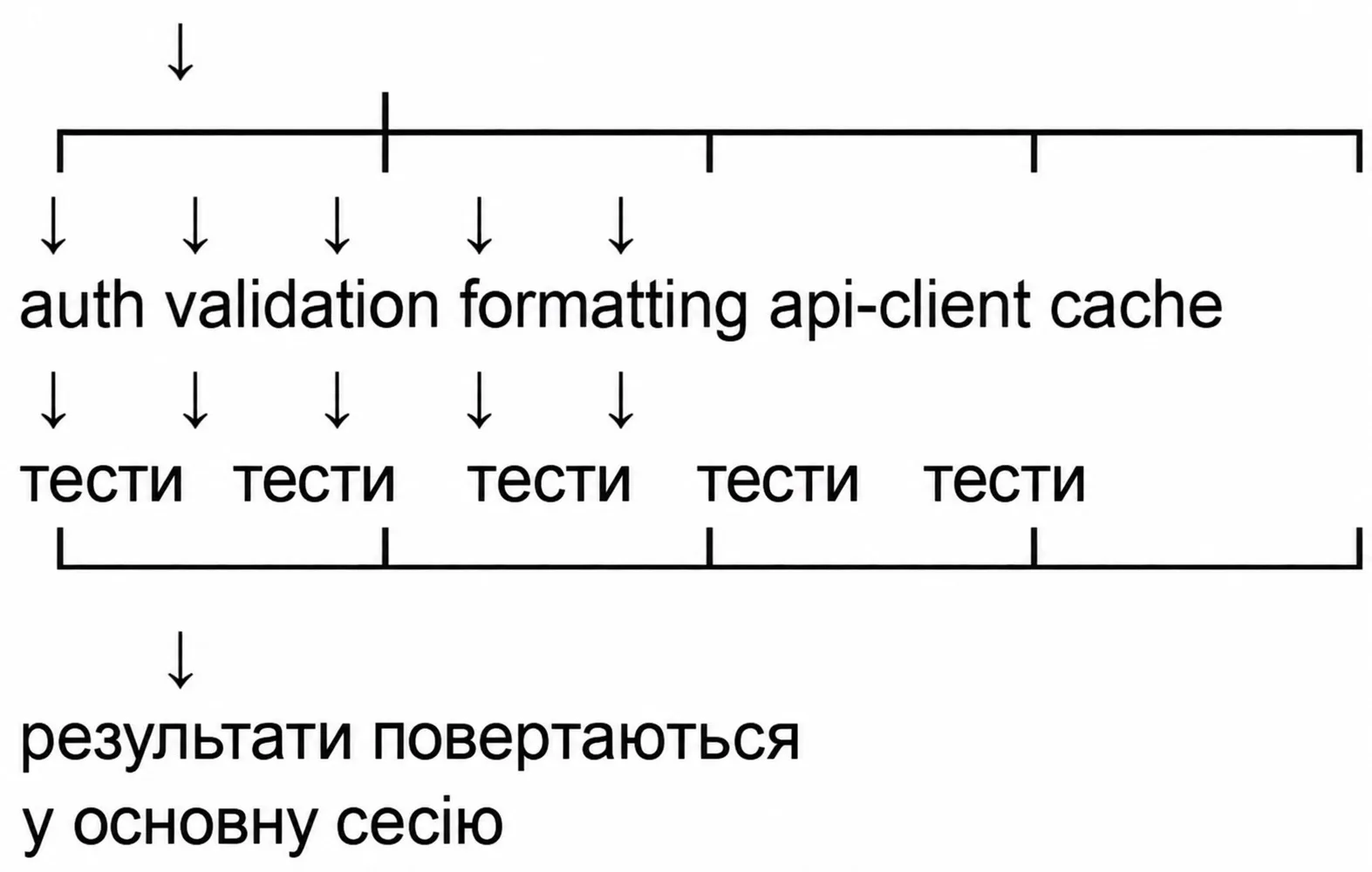 Claude Code subagent dispatching architecture and result aggregation into the parent session
Parallel Execution Lifecycle
- Task Dispatching: The parent session receives a composite prompt (e.g., writing comprehensive tests for five utilities:
auth.ts,validation.ts,formatting.ts,api-client.ts,cache.ts). - Child Context Spawning: Independent subagents are initialized, each receiving its specific scope and target file path.
- Autonomous Execution: Each subagent independently inspects source code, analyzes exported types, crafts test suites, and verifies execution.
- Result Join & Aggregation: The parent session waits for all worker processes to conclude, collects output summaries, and presents a consolidated debrief to the user.
4. Shared vs. Isolated Context: What Subagents Can and Cannot See
A frequent misconception among developers is that subagents possess hive-mind telepathy or retain knowledge from turn 50 of the parent conversation. In practice, Claude Code enforces strict memory separation.
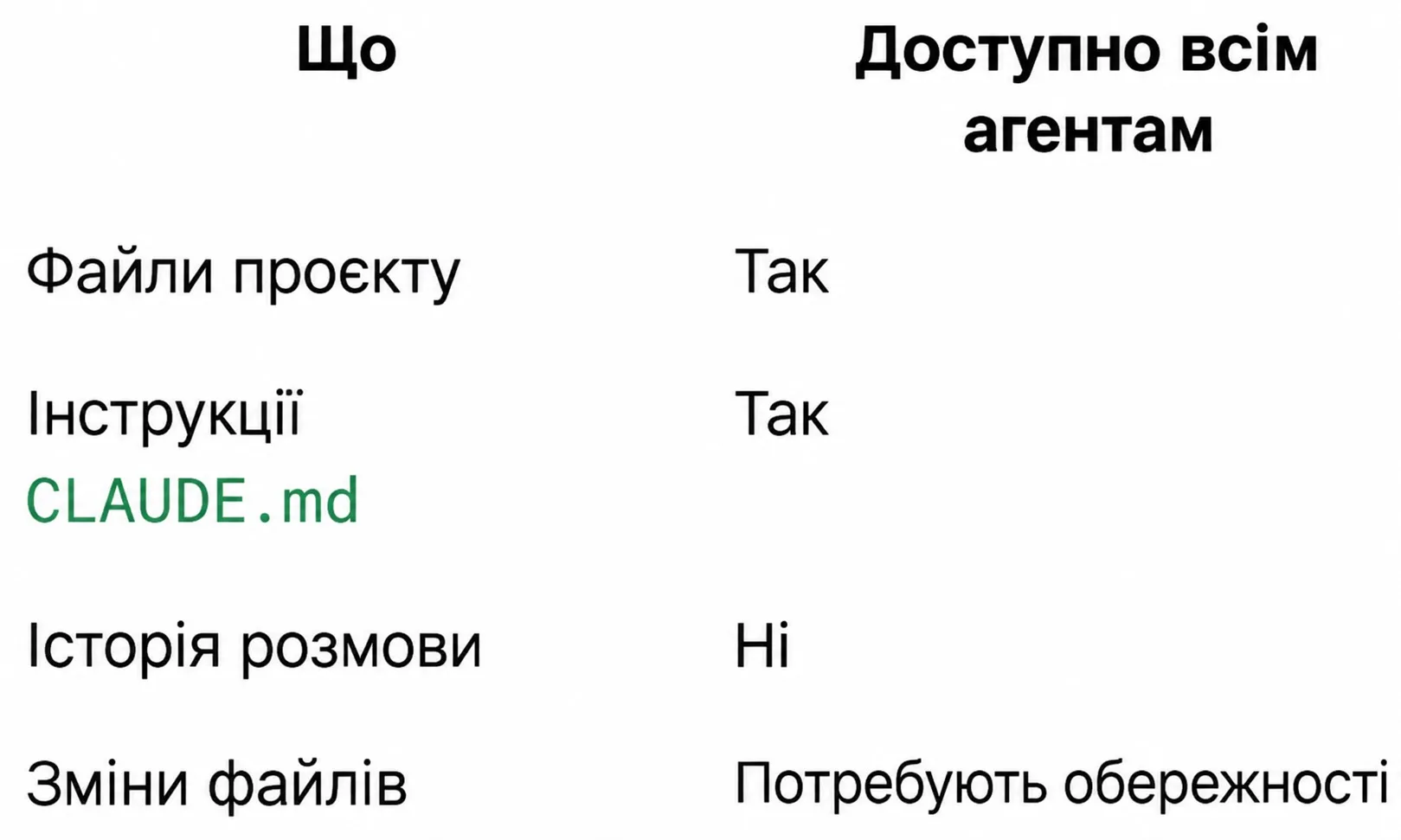 Shared vs isolated subagent context: what is available across all agents vs kept private
| System Resource / State | Shared Across All Agents? | Technical Access Characteristics |
|---|---|---|
| Filesystem Repository on Disk | Yes | All agents possess equal read/write access to project files |
| CLAUDE.md System Instructions | Yes | Every worker inherits global project rules, style conventions, and commands |
| Parent Conversational History | No | Isolated context; subagents only see their immediate task prompt |
| Live File Mutations | Caution Required | No automated file-locking primitives; concurrent writes risk collision |
Enforcing Single-Agent Write Ownership
To avoid codebase corruption during parallel execution, adhere strictly to the Single Writer Principle:
If multiple parallel agents produce modules that must be registered in a single central barrel file (src/index.ts or src/routes.ts), do not instruct subagents to update that central file. Have each subagent write its isolated file, and allow the parent session to append exports after joining results.
5. Prompting Patterns for Launching Parallel Subagents
While Claude Code includes heuristics to detect opportunities for concurrency, explicit parallel phrasing eliminates ambiguity and minimizes planning latency.
Production Prompt Templates
6. Four Core Parallel Work Patterns: Architectural Blueprints
Field experience with Claude Code automation yields four proven orchestration patterns that cover the majority of engineering workflows.
Research Fan-Out
Employed when architectural decisions require evaluating multiple competing technologies or libraries against identical criteria (performance, license compliance, community maintenance, bundle impact). Dedicated subagents research each option in parallel, enabling the parent session to construct an objective decision matrix.
Audit Swarm
One of the most time-efficient patterns in agentic coding. Rather than having a single agent read the codebase four times sequentially, four specialized audit workers review the repository concurrently. Because audits are purely read-only, file write conflicts are fundamentally impossible.
Batch Processor
Ideal for large-scale mechanical migrations where an identical transformation applies across dozens of decoupled files:
- Migrating legacy React class components to modern functional hooks in
src/components/. - Porting test suites from Jest to Vitest.
- Modernizing deprecated API imports across an evolving monorepo.
Feature Sprint
Simultaneous implementation of independent UI widgets, client endpoints, or utility modules:
- Agent 1 builds a dark mode toggle (
ThemeToggle.tsxand related state context). - Agent 2 builds a global search drawer (
SearchBar.tsxand indexing hook). - Agent 3 crafts a notification center flyout (
NotificationsDropdown.tsx).
7. Parallel Execution via CLI: Headless Mode and the -p Flag
Beyond interactive sessions, Claude Code offers enterprise-grade automation via headless mode using the -p (--print) CLI flag. In headless mode, the agent accepts a prompt as a command-line string, executes the task autonomously, and streams structured output directly to standard out.
This allows developers to leverage Unix process management (&) and synchronization primitives (wait):
Advantages of CLI-Driven Parallelism
- Zero Human Overhead: Perfect for scheduled CI/CD jobs, overnight test generation, or pre-commit checks.
- Process-Level Isolation: Every
claudeworker runs within an isolated operating system memory space. - Dedicated Log Streams: Output from each process can be redirected directly into specific logfiles:
claude -p "..." > logs/auth.log 2>&1 &.
In Unix shells, trailing & detaches the command into the background immediately. The native wait builtin halts script execution until all specified process IDs terminate, ensuring downstream build verification only runs after all agents complete.
8. Token Economics, API Rate Limits, and Cost Optimization
While concurrency drastically compresses human waiting time, it introduces distinct financial considerations. Every subagent initializes its own context window; running $N$ parallel subagents consumes approximately $N$ times more context tokens than a single session.
Four Best Practices for Token Budget Control
- Strictly Scoped Task Prompts: Never issue vague mandates like "Fix all repository bugs." State precise file boundaries: "Write 3 unit tests for the parseJwt utility in src/utils/auth.ts."
- Aggressive Context Exclusion: Ensure large build artifacts, database fixtures, and auto-generated types are ignored via
.claudeignoreto avoid redundant multi-megabyte parsing. - Headless
-pfor Deterministic Tasks: Non-interactive execution prevents ballooning chat histories and delivers concise, actionable output. - Merge Trivial Adjustments: Avoid spawning subagents for single-line CSS edits—the overhead of initializing context far outweighs the benefits of parallelism.
9. Hands-on Workshop: Step-by-Step Execution from Tests to Audit Swarms
Solidify your mastery with this structured, end-to-end practical walkthrough.
Step 1. Selecting Isolated Modules and Environment Preparation
Identify three decoupled utility files in your codebase that share no mutual dependencies:
src/utils/auth.tssrc/utils/validation.tssrc/utils/formatting.ts
Verify that corresponding unit test files do not yet exist or require comprehensive rewrites.
Step 2. Formulating and Dispatching the Concurrency Prompt
Launch an interactive Claude Code session in your terminal and issue the following prompt:
Step 3. Monitoring Execution and Test Suite Verification
Observe terminal output as Claude Code dispatches child workers, analyzes each module concurrently, and reports task completions.
Verify generated test suites via your standard runner:
All three test suites should execute cleanly with full test coverage and zero git merge collisions.
Step 4. Executing an Audit Swarm for Codebase Quality
Next, test the analytical Audit Swarm pattern. Issue this multi-vector review request:
10. Summary Cheat Sheet and Parallelization Readiness Checklist
Keep this checklist handy prior to initiating large-scale parallel agent workflows in Claude Code.
Pre-Flight Concurrency Checklist
- Task Independence: No task depends on intermediary results generated by sibling subagents.
- File Write Isolation: Every subagent writes exclusively to its own dedicated file; zero contention for shared configuration barrels.
- Precise Prompt Scoping: Explicit inputs, outputs, file paths, and testing criteria are provided.
- Economic Viability: The time saved justifies the multiplier on base context token consumption.
- Clean Environment: Heavy directories and generated files are filtered via
.claudeignore.
Quick Tool Selection Matrix
| Objective | Recommended Approach | Execution Interface |
|---|---|---|
| Generating tests across 5+ independent modules | Interactive Claude Code or CLI -p | claude -p "..." & |
| Multi-vector security and code audit | Audit Swarm in interactive session | Prompt with 4 specialized subagents |
| Technology / library evaluation | Research Fan-Out | Consolidated decision table |
| Deep core architectural refactoring | Sequential Single Session | Interactive dialog with iterative engineer review |
11. Recommended Next Reading
Deepen your expertise with our latest hands-on playbooks and guides:
- 🚀 Claude Code Projects: How One AI Coordinates a Team of Autonomous Agents →
- 📊 Claude + Excel for Logistics: 10 Ready-to-Use Audit & Rate Playbooks →
- ⚡ Claude + Notion for Business: Automate CRM and Tasks in 30 Minutes →
- 🤖 Autonomous AI Telegram Operator 24/7: Architecture & 10 Production Scenarios →