Using AI Agents to Optimize Disk Space
Learn how AI agents can help you quickly find and remove unnecessary files on your disk.
Tip: Use Codex, Claude Code, or another AI agent to quickly find what is taking up space on your disk.
If your storage is full and you’re unsure where the free space has gone, simply ask Codex to scan the system.
Prompt: "Scan the system and find what is taking up space on the disk. Look for large files, old installers, unused applications, cache folders, abandoned projects, and anything that can be safely cleared. Group the results by category with size indication and mark what can be deleted automatically and what requires my review. Don’t delete anything yet — just show the list."
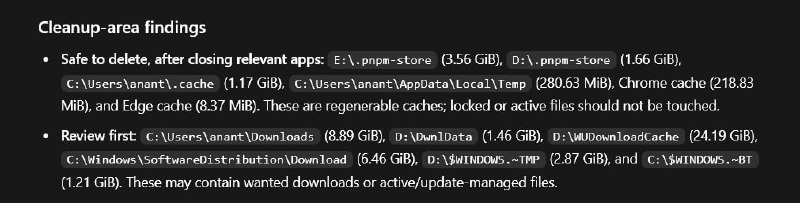
Codex will find the largest files, explain what they are, and show what can be deleted without risk and what should be checked first. This is much faster than manually searching through folders and worrying about accidentally deleting something important.
Why it matters
AnalysisThis advice will help you effectively manage your disk space, saving time and effort in finding unnecessary files.
Discuss in community
Share your questions and insights with developers
Related in Ecosystem
Practical guides, core terminology, and agent skills
Hands-on Guide: Autonomous AI Agents on Open-Source Stack & Free APIs
If you want to build an AI agent, the first question is usually not \"which architecture to choose\", but \"where do I even start and what do I need\".
Top 5 AI Tools of the Month: Breakthroughs for Agents and Developers
A curated review of 5 innovative AI tools of the month: Monid's unified 1,800+ API gateway, Dial virtual numbers, HydraDB OSS graph memory, Doop collaborative canvas, and Orato speech coach.
MCP (Model Context Protocol)
An open standard from Anthropic based on JSON-RPC 2.0 for unified bidirectional connection of AI assistants to external tools, databases, and system environments.
MCP Server
A software service or background process that implements the MCP specification, providing external AI clients with standardized access to function execution, resource reading, and prompt templates.