Avoiding KYC in Claude Ultra: VPS proxy and Anthropic domain blocking
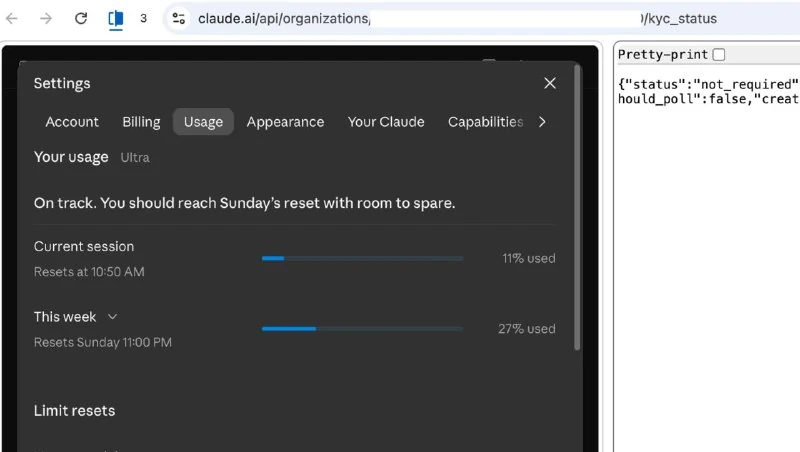
A community-described method claims to bypass KYC in Claude Ultra by routing all traffic through a single VPS, blocking Anthropic domains and disabling telemetry.
The community described a method that allegedly allows avoiding KYC after switching to the Claude Ultra plan. Since October 25, the author has been using the subscription and claims that the service has never asked for identity verification.
According to them, it is commonly believed in the community that moving to Ultra almost guarantees document verification, even for users from the United States. However, their KYC status is still shown as Not Required.
The whole method comes down to one idea: block all Claude and Anthropic domains on the computer, leaving a single controlled connection channel.
To do this, dozens of domains are added to hosts with redirection to localhost, a VPS is connected via Tailscale, and a regular HTTP proxy is run on the server.
Then Claude Code is configured through Anthropic’s official corporate proxy mechanism, telemetry and error reporting are disabled. For the web version, a separate Chrome instance with the same proxy is used.
As a result, all connections and DNS requests pass through one VPS, and the external IP address does not change when switching between clients.
The author also shared a list of domains that should be blocked through hosts.
For each domain, two entries must be added: one for IPv4 and one for IPv6. Both should point to the local address.
The following domains and subdomains are blocked:
- anthropic.com: www, api, console, auth, oauth, a-api, a-cdn, api-staging, statsig, mcp-proxy, mcp-proxy-staging, docs, support, status, portal, api-pr-preview.
- claude.ai: www, api, assets, preview, downloads.
- claude.com: www, api, code, platform, releases, docs, status, support, mcp, as well as gcal.mcp, gmail.mcp, slack.mcp and microsoft365.mcp.
The second step is configuring the proxy in Claude Code through settings.json.
In the env section, it is necessary to specify HTTP_PROXY, HTTPS_PROXY and ALL_PROXY in both uppercase and lowercase, as well as CLAUDE_CODE_HTTP_PROXY, CLAUDE_CODE_HTTPS_PROXY and grpc_proxy.
In all cases, the internal Tailscale VPS address is used with the port and protocol http. Even for HTTPS_PROXY, http must be specified because HTTPS requests are transmitted through a CONNECT tunnel.
In NO_PROXY and no_proxy, only the local loopback address and localhost should remain.
The author paid special attention to preventing a real IP address leak. According to them, after decompiling Claude Code 2.1.309, some data transmission channels could potentially reveal the real IP.
Therefore, they recommend setting the value 1 for the following variables:
CLAUDE_CODE_DISABLE_NONESSENTIAL_TRAFFICDISABLE_TELEMETRYDISABLE_ERROR_REPORTINGDISABLE_GROWTHBOOKDO_NOT_TRACK
In this way, the author tries to route all Claude Code traffic through one VPS and avoid direct connections. However, this setup does not guarantee the absence of IP leaks or KYC checks.
Why it matters
AnalysisThe case shows how users try to control IP addresses and metadata when using AI services, but such setups do not guarantee that KYC checks or data leaks will be avoided.
Discuss in community
Share your questions and insights with developers
Related in Ecosystem
Practical guides, core terminology, and agent skills
Community Discusses Anthropic Bans Over the Past Week
Comments mention users reporting accounts banned by Anthropic during the past week, with no details provided.
Service estimates the risk of being banned by Anthropic
Chinese developers launched a tool that analyzes IP address, country, ISP, connection type, DNS and WebRTC leaks to score trust from 0 to 100 for Anthropic-related access.
Computer Use via AI
Anthropic's technology (introduced in Claude 3.5 Sonnet) enables neural networks to control operating systems like a human: taking screenshots, analyzing window coordinates, moving the mouse cursor, clicking buttons, and entering text without using specialized APIs.
Constitutional AI (RLAIF)
A behavior alignment method developed by Anthropic (creators of Claude). Instead of relying on millions of hours of human labor, the model critiques and corrects its own responses based on a clear set of ethical principles ('Constitution').