Creating an Interactive Code Map with Codex
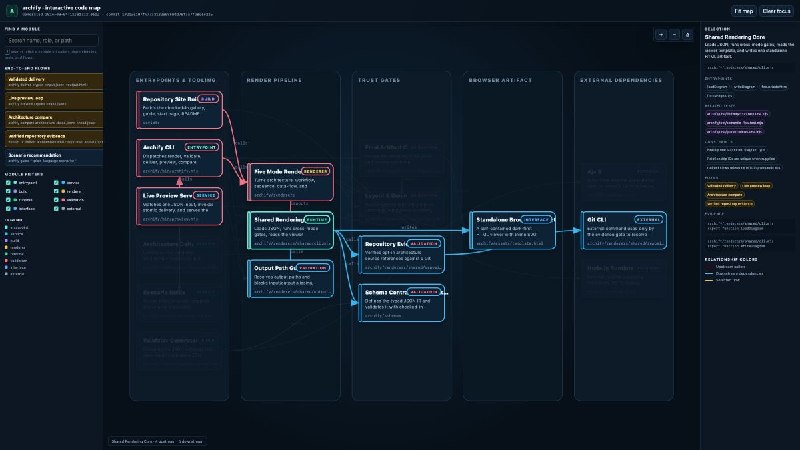
Learn how to use Codex to create an interactive map of your code that tracks module changes and dependencies.
Creating an Interactive Code Map with Codex
Ask Codex to create an interactive map of your repository, and then mark which modules have changed since its generation.
By clicking on any module, you can see its calling components, dependencies, main execution flows, related tests, and supporting data from the source code.
Codex generates:
docs/codemap/codemap.htmldocs/codemap/codemap.jsondocs/codemap/codemap.lock
Full Prompt
Analyze the current codebase. Do not modify product code. Only create or update files under docs/codemap/.
Ignore vendor, build, dist, cache, and other generated directories.
If docs/codemap/ already exists, first compare the existing codemap.lock with the current repo and list the modules that changed. Then regenerate these three files together:
docs/codemap/codemap.html
Build a fully self-contained interactive code map that opens directly in a browser. Include:- major modules, services, databases, queues, and external dependencies
- no more than 20 primary nodes; group low-level files under their parent module
- calls and data flows between modules
- the 3-5 most important end-to-end flows
- a clear dark theme by default
- system boundaries and the most important data flows visible on the first screen
- color-coded module types with a simple legend
- automatic layout that minimizes crossing edges
- clicking any module highlights its upstream callers, downstream dependencies, related tests, and the flows it belongs to
- selecting a flow highlights its complete path
- search, filtering, zoom, and drag controls
At the top, show the repo name, generation time, and the commit it was generated from.
docs/codemap/codemap.json
Use this structure:JSON{ "generated_at": "", "generated_from_commit": "", "scope": [], "nodes": [], "edges": [], "flows": [] }Each node must include:
- id
- path
- role
- entrypoints
- tests
- constraints
- evidence
Each edge must include:
- from
- to
- type
- evidence
type may only be:
- imports
- calls
- reads
- writes
- publishes
- subscribes
Each flow must include:
- trigger
- steps
- outcome
Every step must reference an existing node id. Attach the matching source path and symbol to every node and edge. Mark any relationship without source evidence as unknown. Do not guess.
docs/codemap/codemap.lock
Use parseable JSON to record:- the current commit
- whether the working tree has uncommitted changes
- generation time
- scanned scope
- excluded directories
- the fingerprint algorithm
- a deterministic fingerprint for each top-level module, calculated from its tracked file paths and current file contents
If no existing
codemap.lockis found, treat every module as new and generate the full map.When finished, verify that:
codemap.jsonparses successfully- every node path exists and every evidence symbol can be found in the source
- every edge and flow step references an existing node
codemap.htmlandcodemap.jsonuse the same nodes, edges, and flowscodemap.lockmatches the current commit, working tree state, and module fingerprints- every relationship without source evidence is marked unknown
These three files must always be generated together from the current repo. Never edit only one of them manually.
Finally, show:
- files created or modified
- stale modules
- remaining unknowns
- validation results
- the complete diff
Additional Rule
Add a rule in AGENTS.md to keep the code map always synchronized with the repository:
At the start of every code-changing task, compare the current repo with docs/codemap/codemap.lock.
Before modifying a module, use docs/codemap/codemap.json to answer three questions:
- What calls it?
- What does it affect?
- Which tests cover it?
If the map is stale or cannot answer those questions, regenerate codemap.html, codemap.json, and codemap.lock before changing the code.
Whenever module boundaries, dependencies, routes, databases, queues, or major data flows change, update the code map in the same commit as the code.
Why it matters
AnalysisThis approach helps maintain the relevance of code documentation, which is crucial for teamwork and reduces the risk of errors when making changes. Using an interactive code map simplifies understanding the project's structure.
Discuss in community
Share your questions and insights with developers
Related in Ecosystem
Practical guides, core terminology, and agent skills
Part II. How to Work with Codex + Optimization/Security/Team
Codex is not just code autocomplete in a chat; it is a full-fledged engineering agent: it reads the repository, plans changes, edits files, runs tests, reviews its own diffs, and c...
Codex for HR Teams — How to Organize Processes with AI
A comprehensive practical guide to systematic HR process automation with OpenAI Codex: recruiting pipelines, onboarding architectures, compliance tracking, dashboards, and database MCP server integration.
MCP (Model Context Protocol)
An open standard from Anthropic based on JSON-RPC 2.0 for unified bidirectional connection of AI assistants to external tools, databases, and system environments.
MCP Server
A software service or background process that implements the MCP specification, providing external AI clients with standardized access to function execution, resource reading, and prompt templates.