How Claude Writes SEO Articles for a Blog and Gathers Millions of Impressions
A practical workflow using Claude, Codex, Search Console, MCP, and publishing APIs to automate SEO content and improve search traffic.
Initially, the problem was that we appeared in search results, but with little benefit. In spring, out of 1,000 people who saw us in Google, only 3–4 clicked through to the site.
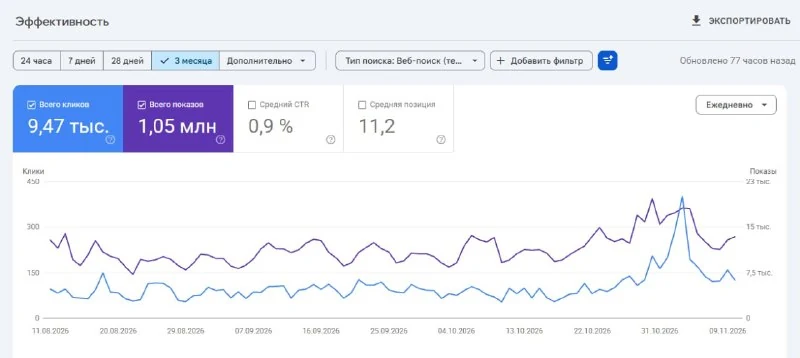
Over the past three months, our site hypescribe.com received 1 million impressions in Google and 9,000 clicks. CTR grew from 0.4% to 0.9%, and clicks nearly doubled compared with the three months before that.
These numbers may not impress an experienced SEO specialist, but I am new to this, so the result suits me. Here is my pipeline.
1. Query and competitor analysis
Claude takes queries from Search Console for the last 1–3 months and splits them into two groups:
- topics where the answer is the product itself; these bring registrations;
- everything else that brings clicks but almost no registrations.
We set aside the second group and take articles from the first group that sit on the second search-results page, positions 8–20, because they are easiest to push into the top.
Then Claude studies who ranks where and how their articles are structured. A separate subagent collects facts about competitors from their websites and saves quotes, links, and dates. Otherwise, Claude is likely to invent features that competitors do not have.
2. Writing the article
Next, Claude writes the article itself. Title and description matter a lot because people see them in search results and decide whether to click.
The title should match the query, while the description should give an immediate TLDR answer: who it is for, how much it costs, and what the catch is.
We also honestly write where a competitor is better. Such articles convert better, and AI search engines cite them more often.
It is also important to add images, tables, and lists, because most readers skim articles, and a wall of text can scare them away.
Claude generates images too:
- for assets and illustrations, it uses
codex cli image_gen; - for anything with text or interface elements, it builds HTML and takes screenshots.
Another tip: feature an author in the blog, as this also gives an SEO boost.
3. Review, publishing, and monitoring
When the article is written, it goes to Codex for review. Codex rates how much the text is “AI slop” on a scale of 1 to 10 and keeps rewriting it until the score is 3 or lower.
The list of forbidden patterns is similar to the humanizer skill: avoid constructions like “not just X, but Y,” long dashes, and so on.
Then there is another pass where Codex pretends to be an ordinary reader: it scrolls through screenshots of the page from desktop and mobile and says whether it found what it was looking for and whether it would try the product.
Finally, after my approval, Claude publishes through the API, submits the page to Bing, and requests Google indexing through browser-use.
We measure results after a week and again after three weeks. If clicks drop by more than 30% and the position does not recover, we roll back.
My involvement is minimal, and Claude has full access to all resources:
P.S. If the site is new and has no impressions yet, Search Console will provide almost nothing. In that case, connect SeRanking or a similar tool so the agent can see what people are searching for.
4. SEO is not only about the blog
Besides articles, we also do:
- dedicated pages for specific tasks, matching exactly what people type into Google. On such a page, a user can upload a file immediately instead of reading an article;
- mini-tools, with links in the footer and inside articles;
- backlinks: we agreed with neighboring services to mention each other in roundups and joined AI-tool catalogs such as There's An AI For That, which still brings registrations;
- Claude collected a list of 58 platforms where we could be included and wrote application texts for each one.
Why it matters
AnalysisIt shows how agents and MCP can automate an SEO workflow from query analysis to publication. The approach is systemic, not a one-off text generation.
Discuss in community
Share your questions and insights with developers
Related in Ecosystem
Practical guides, core terminology, and agent skills
Connecting Instagram and Claude (Practical Guide)
In this guide, we will show you how to connect Instagram to Claude and work with account data directly in the chat. Once set up, you can analyze posts, Stories, Reels, and audience...
Migrating from Claude Code to Codex: How to Move CLAUDE.md, MCP, Skills, Slash Commands, and Settings
Complete engineering guide on migrating from Claude Code to OpenAI Codex CLI: porting CLAUDE.md to AGENTS.md, configuring MCP, sandboxing, hooks, and retaining Claude models.
Claude Code
The official terminal agent from Anthropic, operating directly in the command line via Claude 3.7 Sonnet with native support for Bash, Git, file systems, and the MCP protocol.
Cline (Previously Claude Dev)
An open-source autonomous development agent for VS Code that supports Bring Your Own Key (BYOK) APIs, direct integration with the MCP protocol, terminal, and an embedded browser.