Opus builds a macOS utility to round MacBook screen corners
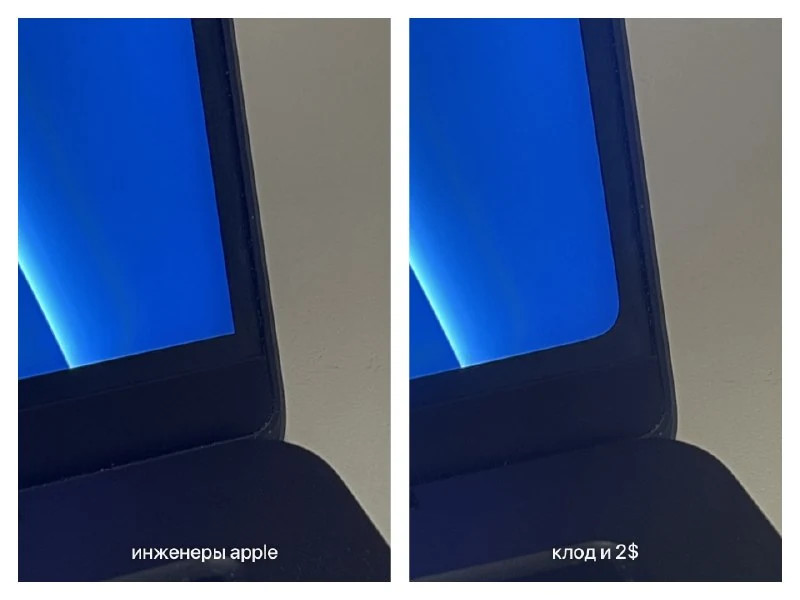
A developer used Opus to create a lightweight background utility for macOS that rounds the bottom corners of the built-in MacBook display to match the new OLED MacBook Pro design.
I didn't know what to spend today's limits on before reset, and inspired by the new OLED MacBooks, I decided to put Opus to work fixing Apple's past mistakes.
After 20 years, they finally realized the bottom corners should be rounded for symmetry, but I need that now.
If useful, the prompt:
Create a lightweight background utility for my MacBook that rounds the bottom corners of the built-in display the same way the top corners are rounded, so the screen looks like the new OLED MacBook Pro. The shape must exactly match the top corners, so don't tune the radius by eye: Apple's corners are not circular, and the system itself knows the real panel contour, so find it and take the shape from there. The utility should start at login, restart itself after a crash, not appear in the Dock, pass through clicks and active corners, stay out of screenshots, screen recording, and screen sharing, use no CPU when idle, not wake up without a reason, and hide the corners in fullscreen apps. A normal window on top should move with the desktop when swiping between spaces, while in fullscreen it should behave differently depending on where the process is running. Make sure the corners stay fixed like part of the glass, and verify this with a sequence of frames during switching. If undocumented system features are required, connect them so that if they disappear, the utility does not crash and keeps drawing the corners. Add a debug mode with bright corners visible in screenshots, and test everything yourself: pixel-perfect matching with the top corners, desktop switching, entering and exiting fullscreen, restarting inside a fullscreen space, Mission Control, recovery after
kill -9, and idle load. Do not squeeze memory below what an empty app on the system windowing framework occupies — that's a waste of time. Provide a script for install, uninstall, status, and restart.
It will feel fresh and aesthetic (it should have been like this from the factory 😡).
Why it matters
AnalysisShows how an AI coding assistant can turn a small UI annoyance into a highly specified macOS tool with reliability, invisibility, and automated test requirements.
Discuss in community
Share your questions and insights with developers
Related in Ecosystem
Practical guides, core terminology, and agent skills
Vibe Coding for Non-Developers: How Marketers, Designers, and PMs Build Products with Claude and Cursor
A practical guide to Vibe Coding without the terminal: 45 techniques for working in Claude and Cursor tailored for marketers, designers, and PMs. From website edits to routine automation.
Tab Blind Acceptance (Tab Fatigue)
A psychological trap for modern developers where gray autocomplete suggestions from Copilot or Cursor are accepted by pressing the Tab key without careful reading and analysis. This leads to a loss of control over one's codebase and the emergence of hidden bugs.
AI Refactoring: Safely Refreshing Legacy Code Without Changing Its Logic
A methodology for improving the internal structure, readability, and performance of existing Legacy Code using language models without altering its external behavior. It enables breaking down large spaghetti functions into neat modules and converting old JavaScript to modern TypeScript.
Antigravity users warned: changing reasoning levels can wipe prompt cache
Users of Antigravity are advised not to switch High, Medium, and XHigh reasoning levels during a single session with Gemini 4 Carbon or Neon, as this can fully reset the prompt cache.