Auto Mode Becomes Default Setting in Claude Code
Auto Mode is set to become the default permission mode in Claude Code, allowing for automatic request verification without manual confirmation. This enhances agent efficiency by reducing task execution time.
Auto Mode Becomes Default Setting in Claude Code
Starting August 14, Auto Mode will become the default permission mode for Pro, Max, and Team users.
Auto Mode checks each tool invocation with a separate classifier and decides whether an action can be performed without manual confirmation.
Why Auto Mode is Better than Manual Confirmation?
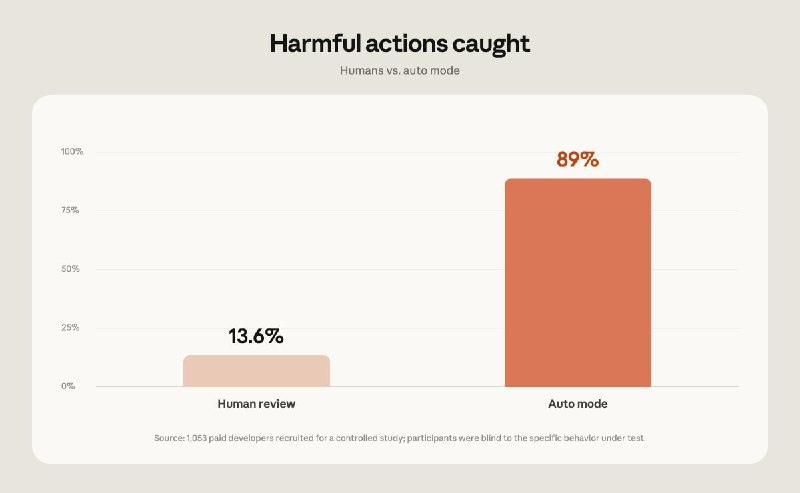
One reason Anthropic trusts Auto Mode more than manual confirmation is based on a study involving 1,053 paid testers. In this study, a typical permission request was replaced with a deliberately dangerous command. Nothing was actually executed — users only saw text. Danger was noticed in only 13.6% of cases, and after 50 requests, the figure dropped to about 5%.
Auto Mode blocked the same commands in 89% of cases, and its effectiveness did not significantly decrease even in long sessions.
Long Agent Tasks
The second reason for the switch is long agent tasks. Models like Opus 5 can already plan and execute multi-hour work, but this is of little use if the agent stops at each tool invocation and waits for confirmation.
With Auto Mode, you can launch one task or several in parallel and then return to ready PRs for review.
Token Consumption
The classifier itself consumes a small number of additional tokens, but starting today, they will no longer count against the limits for Pro, Max, and Team. Later, this change will also apply to Enterprise and API users when Auto Mode becomes the default setting for them as well.
Why it matters
AnalysisThis is important because the new Auto Mode significantly enhances agent efficiency, allowing them to perform tasks without delays for confirmation. This can greatly reduce project execution time and improve team productivity.
Discuss in community
Share your questions and insights with developers
Related in Ecosystem
Practical guides, core terminology, and agent skills
Claude + Notion for Business: Automating CRM, Tasks, and Content in 30 Minutes
A step-by-step B2B guide to integrating Claude with Notion: ready-to-use database architecture, triggers, formulas, automation scripts, and prompt templates.
15 Claude Cowork Skills Pack: ready-to-use skills for work and automation
A practical set of 15 ready-to-use Agent Skills for Claude Code and Cowork: site automation, contract review, invoice generation, and analytics.
AI FOMO Syndrome (Fear Of Missing Out on Breakthroughs)
A psychological state of chronic anxiety and exhaustion stemming from the feeling of falling behind in the rapid AI revolution. Triggered by daily announcements of new models, plugins, and sensational headlines from influencers on social media.
AI-Native Teams: How 3 People Scale a Company to 50 Employees
A new organizational model for modern business and development (AI-Native Teams). Teams of 2–5 multidisciplinary specialists leverage neural networks and autonomous agents to handle tasks in legal, marketing, programming, and customer support without bloating the workforce.