Google Cloud credits for Google AI subscribers: how to activate and use them
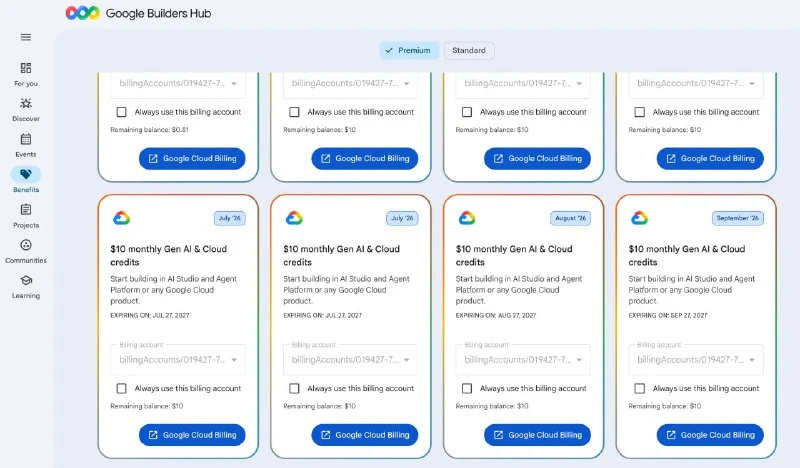
Google AI Pro and Ultra subscribers can receive monthly Google Cloud credits and use them in Google AI Studio or for Gemini API requests.
Google AI subscribers should not forget about monthly Google Cloud credits. Unclaimed credits carry over to future months, so users can still collect them for missed periods.
- Pro: $10 per month.
- Ultra 5x: $40 per month.
- Ultra 20x: $100 per month.
The credits can be used in Google AI Studio or to pay for Gemini API requests. They can be claimed on the Google Cloud benefits page.
To use the credits in Google AI Studio:
- Go to the Google AI Studio billing page.
- Link the payment account to which the credits were granted.
- Create a paid API key in a project associated with that account.
Before using the credits, the balance must be topped up by at least $5. Google will spend the granted credits first and only then use the user's own funds.
Why it matters
AnalysisThis helps developers and AI users reduce spending on Gemini API calls and AI Studio experiments while making sure they do not lose already granted cloud credits.
Discuss in community
Share your questions and insights with developers
Related in Ecosystem
Practical guides, core terminology, and agent skills
Google AI Studio: Free Gemini API Keys
Official Google sandbox: get free Gemini 2.0/1.5 API keys without a credit card, setup system prompts, and test the 2M token context window. Limits & guide 2026.
Claude Code Projects: How a Single AI Orchestrates a Team of Autonomous Agents
A deep dive into Claude Code Projects: Coordinator and Threads architecture, parallel branches, shared memory via MEMORY.md, and cloud agent management.
Claude Code adds automatic fixes for excessive token usage in /usage menu
Starting with Claude Code 2.1.305, users can automatically apply fixes that reduce excessive token usage and inspect Prompt cache hit/miss statistics.
Skillsync Launches a Marketplace for AI Agent Skills
Skillsync aggregates AI agent skills currently scattered across GitHub, Slack, and Google Drive into one marketplace, enabling developers to monetize their work.