# JSON — Structured Data for Programs, APIs, and AI Agents
> A complete hands-on guide to JSON: syntax specifications, serialization via parse and stringify, REST API consumption, JSON Schema validation, and structured outputs for LLMs.
## 1. What Is JSON and Why It Became the Industry Standard
**JSON** (*JavaScript Object Notation*) is the universal standard for exchanging structured data between web servers, mobile clients, databases, and modern AI agents.
When software systems communicate, exchanging unformatted plain text is unreliable and inefficient:
> *"Elena Kovalchuk, 29 years old, Kyiv, premium subscription active, skills: Python, SQL."*
While a human can interpret that sentence effortlessly, an algorithm must expend considerable processing power on heuristic entity extraction. In JSON, the exact same information is represented deterministically:
```json
{
"id": 1042,
"name": "Elena Kovalchuk",
"age": 29,
"city": "Kyiv",
"isPremium": true,
"skills": ["Python", "SQL"]
}
```
Any parser in any modern language (JavaScript, Python, Go, Rust) can instantly look up the `"city"` key and retrieve `"Kyiv"` without ambiguity.
```mermaid
flowchart LR
A["Client UI
(React / Mobile App)"] -->|HTTP POST JSON| B["REST API Server
(Node.js / Python)"]
B -->|SQL / NoSQL JSONB| C["Database
(PostgreSQL / MongoDB)"]
B -->|Structured Output JSON| D["LLM / AI Agent
(Claude / OpenAI)"]
```
### Why JSON Is Language-Agnostic
Despite containing "JavaScript" in its name, JSON is a language-independent text format defined by RFC 8259. It operates as the standard communication medium across operating systems and microservices via the `application/json` MIME type.
---
## 2. Anatomy of JSON: Objects, Arrays, and Primitive Values
All JSON documents are built from two structural containers (objects and arrays) and six fundamental value types.
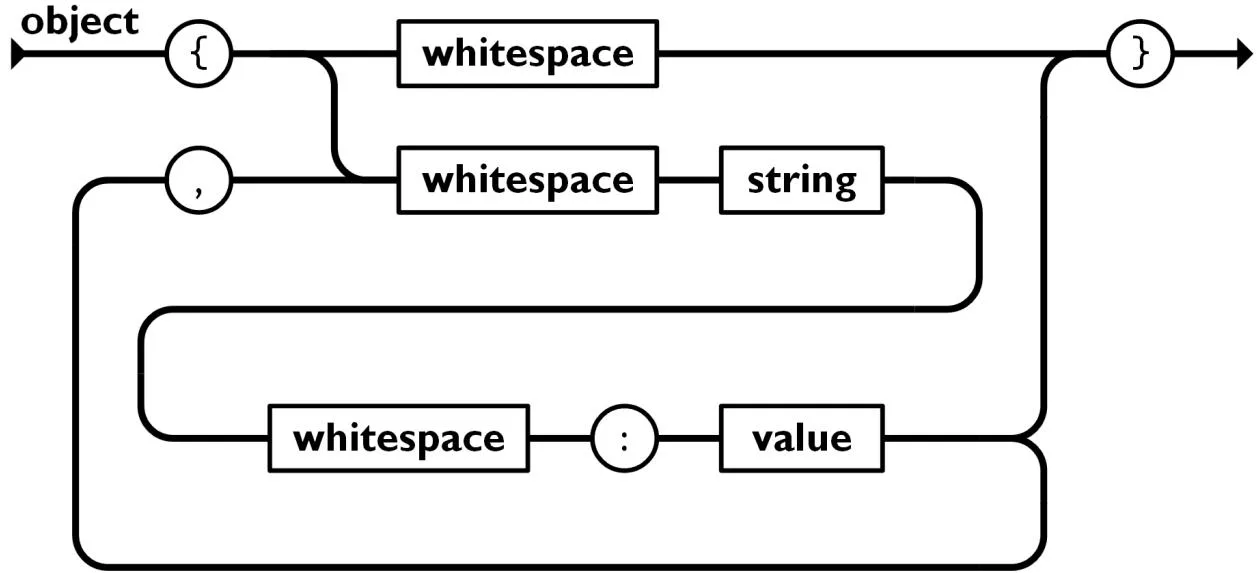
### Object (JSON Object)
An object is an unordered collection of `key: value` pairs wrapped in curly braces `{}`. Keys must always be double-quoted strings.
```json
{
"username": "alex_dev",
"email": "alex@example.com",
"role": "admin"
}
```
### Array (JSON Array)
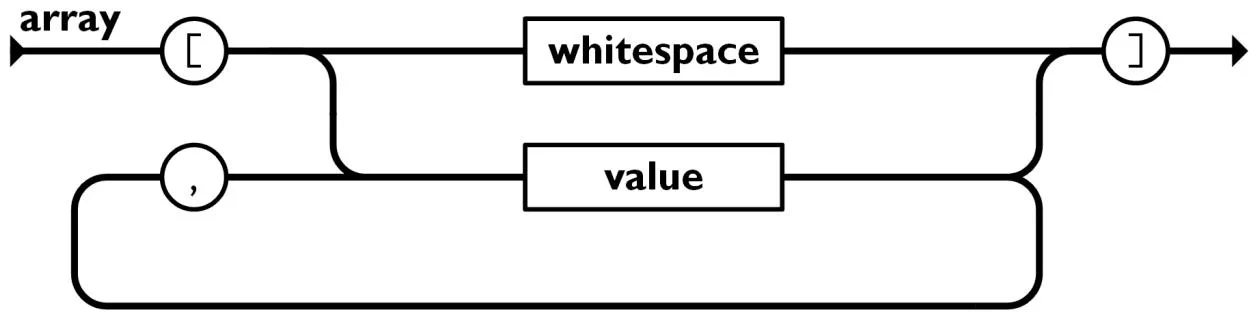
An array is an ordered sequence of values wrapped in square brackets `[]`. Elements are zero-indexed and can contain any valid JSON type.
```json
{
"supportedLocales": ["uk", "en", "es", "de"],
"primeNumbers": [2, 3, 5, 7, 11]
}
```
### Allowed Value Types
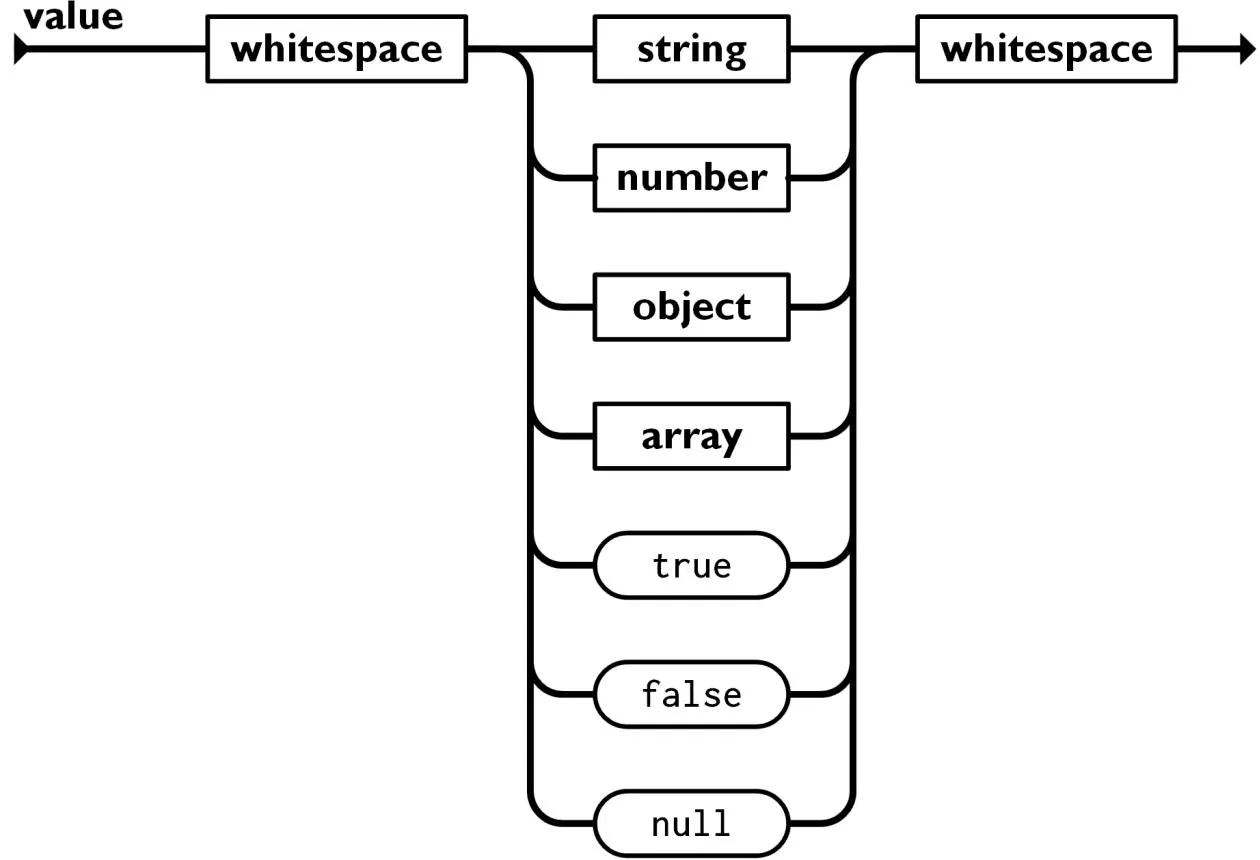
JSON strictly supports six primitive value types:
| Value Type | Syntax Rules and Description | Example |
| :--- | :--- | :--- |
| **String** | Sequence of Unicode characters wrapped in double quotes | `"Hello, World!"` |
| **Number** | Integer or floating-point number (no hex, no trailing dots) | `42`, `-12.5`, `1.5e3` |
| **Boolean** | Strictly lowercase literal: `true` or `false` | `true`, `false` |
| **Null** | Literal representing the intentional absence of a value | `null` |
| **Object** | Nested key-value container | `{"nested": true}` |
| **Array** | Nested ordered list of values | `[1, 2, 3]` |
---
## 3. Strict Syntax Rules and Common Pitfalls
JSON is significantly more rigid than JavaScript or Python syntax. A single misplaced comma or quote invalidates the entire payload.
### Five Core Syntax Principles
1. **Double Quotes Exclusively:** All keys and strings must use `"double quotes"`. Single quotes (`'text'`) cause fatal parser errors.
2. **No Trailing Commas:** Commas after the last key-value pair or array element are strictly illegal.
3. **Colons for Key-Value Delimitation:** A colon `:` is the only valid separator between a key and its value.
4. **Zero Comments Allowed:** JSON does not support `//` or `/* */` comments. Explanatory metadata must be included as regular fields (e.g. `"_comment": "Notes"`).
5. **Restricted Runtime Types:** JSON cannot serialize `undefined`, `NaN`, `Infinity`, functions, or Date objects directly.
### Valid vs. Invalid JSON Comparison
:::tabs
@tab Valid JSON
```json
{
"product": "MacBook Pro",
"price": 1999.99,
"inStock": true,
"tags": ["laptop", "apple", "m-series"]
}
```
@tab Invalid JSON (Common Pitfalls)
```json
{
product: 'MacBook Pro', // Error: unquoted key and single quotes
"price": 1999.99,
"inStock": true,
"tags": ["laptop", "apple",], // Error: trailing comma in array
} // Error: trailing comma before closing brace
```
:::
---
## 4. Key Differences Between JSON and JavaScript Objects
Beginners often conflate JavaScript object literals with JSON. However, they represent distinct concepts in runtime architecture.
```mermaid
flowchart TD
subgraph Serialized_String["JSON (Serialized Byte Stream)"]
J["'{\"name\":\"Max\",\"age\":30}'"]
end
subgraph In_Memory_Structure["JavaScript Object (RAM Structure)"]
O["{ name: 'Max', age: 30 }"]
end
J -->|JSON.parse| O
O -->|JSON.stringify| J
```
### Direct Feature Comparison
| Attribute | JavaScript Object Literal | JSON Specification |
| :--- | :--- | :--- |
| **Format** | Dynamic in-memory data structure | Serialized text string |
| **Key Constraints** | Identifiers can be unquoted or Symbols | Must strictly be double-quoted strings |
| **Type Support** | Functions, `Date`, `Map`, `Set`, `undefined` | Exactly 6 data types (string, number, bool, null, obj, arr) |
| **Comments** | Fully supported (`//` and `/* */`) | Prohibited |
| **Trailing Commas** | Allowed in modern ECMAScript | Prohibited |
---
## 5. Navigating and Querying Nested Data Structures
In real-world applications, API responses feature deep hierarchies. Accessing nested values requires dot notation for objects and index notation (`[]`) for arrays.
### Complex Data Sample
```json
{
"orderId": "ORD-94821",
"customer": {
"fullName": "Taras Shevchenko",
"contacts": {
"email": "taras@example.org",
"phones": ["+380501112233", "+380679998877"]
}
},
"items": [
{ "id": 1, "title": "4K Display", "price": 450, "qty": 1 },
{ "id": 2, "title": "Mechanical Keyboard", "price": 120, "qty": 2 }
]
}
```
### Element Lookup Patterns
- `order.orderId` $\rightarrow$ evaluates to `"ORD-94821"`
- `order.customer.fullName` $\rightarrow$ evaluates to `"Taras Shevchenko"`
- `order.customer.contacts.phones[0]` $\rightarrow$ evaluates to `"+380501112233"`
- `order.items[1].price` $\rightarrow$ evaluates to `120`
> [!TIP]
> In modern JavaScript and TypeScript, always use optional chaining (`order?.customer?.contacts?.email`) to prevent unhandled `TypeError: Cannot read properties of undefined` exceptions.
---
## 6. JSON in REST APIs: Requests, Responses, and Headers
Practically all modern web services rely on JSON as the payload transport mechanism over HTTP.
```mermaid
sequenceDiagram
autonumber
actor Client as Client (Browser / App)
participant Server as REST API Server
Note over Client: Object serialization to string
Client->>Server: POST /api/users (Header: Content-Type: application/json)
Note over Server: JSON parsing, validation, DB write
Server-->>Client: 201 Created (Header: Content-Type: application/json)
Note over Client: response.json() parsing
```
### Essential HTTP Headers
1. **`Content-Type: application/json`:** notifies the server or client that the request or response body contains a serialized JSON payload.
2. **`Accept: application/json`:** informs the backend that the client expects the response strictly in JSON format (rather than XML or HTML).
---
## 7. Serialization and Deserialization: parse and stringify
Translating in-memory objects into raw text is called **Serialization**, while converting text back into an object model is **Deserialization**.
:::tabs
@tab JavaScript / TypeScript
```typescript
// 1. Deserialization (Text -> Object)
const jsonString = '{"title":"Laptop","price":1200}';
const product = JSON.parse(jsonString);
console.log(product.title); // "Laptop"
// 2. Serialization (Object -> Text)
const user = { name: "Danylo", active: true };
const serialized = JSON.stringify(user, null, 2); // 2-space indentation
```
@tab Python
```python
import json
# 1. Deserialization
raw_text = '{"title": "Laptop", "price": 1200}'
product = json.loads(raw_text)
print(product["title"])
# 2. Serialization
user_dict = {"name": "Danylo", "active": True}
json_string = json.dumps(user_dict, indent=2, ensure_ascii=False)
```
@tab Go
```go
package main
import (
"encoding/json"
"fmt"
)
type Product struct {
Title string `json:"title"`
Price int `json:"price"`
}
func main() {
raw := []byte(`{"title":"Laptop","price":1200}`)
var p Product
json.Unmarshal(raw, &p)
fmt.Println(p.Title)
}
```
:::
---
## 8. Syntax Error Diagnostics and Validation
When input contains invalid syntax, invoking `JSON.parse()` throws an unhandled `SyntaxError`, which can crash an entire thread if uncontained.
```javascript
try {
const data = JSON.parse(untrustedUserInput);
} catch (error) {
console.error("Invalid JSON payload:", error.message);
}
```
### Quick Diagnostic Checklist
- [ ] Are all opening brackets and braces matched with corresponding `}` and `]`?
- [ ] Are all keys and string values enclosed in double quotes `""`?
- [ ] Is there any trailing comma before a closing bracket?
- [ ] Are forbidden values (`undefined`, `NaN`, comments) eliminated?
- [ ] Are nested quotes properly escaped: `"quote": "Word in \"quotes\""`?
---
## 9. JSON Schema: Contract Enforcement and Data Validation
A document can be syntactically valid JSON while failing critical business domain requirements (e.g. an age field containing `"twenty"` instead of an integer).
**JSON Schema** is the international specification for describing and validating JSON data structures.
```json
{
"$schema": "https://json-schema.org/draft/2020-12/schema",
"title": "UserRegistrationSchema",
"type": "object",
"properties": {
"email": {
"type": "string",
"format": "email"
},
"age": {
"type": "integer",
"minimum": 18
},
"roles": {
"type": "array",
"items": { "type": "string" },
"minItems": 1
}
},
"required": ["email", "age"]
}
```
Validation libraries (such as Ajv in Node.js or jsonschema in Python) automatically verify incoming payloads against this contract before touching business logic.
---
## 10. Structured Outputs for LLMs, Function Calling, and AI Agents
In autonomous agent development, unstructured prose is being superseded by **Structured Outputs**.
AI agents (such as Claude Code, OpenAI Function Calling, and LangChain) communicate with tools using JSON parameters:
```json
{
"name": "sendEmailNotification",
"arguments": {
"recipient": "user@example.com",
"subject": "Invoice generated",
"invoiceId": "INV-2026-09"
}
}
```
### Best Practices for Enforcing JSON from LLMs
1. **Provide Explicit Schemas:** Supply a strict TypeScript interface or JSON Schema in the system prompt.
2. **Request Pure Output:** Instruct the model: *"Return ONLY a raw valid JSON object. Do not wrap in markdown fences or include conversational commentary."*
3. **Use API Structured Output Modes:** Utilize provider-level JSON mode features (such as Anthropic Tool Use or OpenAI Structured Outputs) to enforce token-level grammar constraints.
---
## 11. Format Comparison: JSON vs. YAML vs. XML vs. TOML
| Format | Human Readability | Comment Support | Syntactic Overhead | Primary Industry Use Case |
| :--- | :--- | :--- | :--- | :--- |
| **JSON** | Moderate / High | No | Minimal | Web APIs, client-server transport, AI tool calling |
| **YAML** | Very High | Yes | Zero (indentation-based) | CI/CD pipelines (GitHub Actions, Kubernetes manifests) |
| **TOML** | Very High | Yes | Low | Application configs (Cargo, pyproject.toml) |
| **XML** | Low | Yes | High (verbose tags) | Legacy enterprise services, SOAP, SVG graphics |
---
## 12. Hands-on Workshop, Self-Assessment, and Final Checklist
Reinforce your understanding by walking through a complete API fetch, parse, and query cycle.
### Complete Retrieval and Consumption Workflow
```typescript
// Fetching user data via the native Fetch API
async function fetchUserProfile(userId: number) {
try {
const response = await fetch(`https://api.example.com/users/${userId}`, {
headers: { Accept: "application/json" }
});
if (!response.ok) {
throw new Error(`HTTP Error: ${response.status}`);
}
// Automatic JSON deserialization
const user = await response.json();
// Safe property reading with fallbacks
console.log(`User: ${user.name}`);
console.log(`Primary Skill: ${user.skills?.[0] ?? 'none'}`);
return user;
} catch (err) {
console.error("Failed to retrieve user profile:", err);
}
}
```
### Review Questions
> **1. What error occurs when single quotes are used to wrap strings in a JSON file?**
>
> > [!TIP]
> > **Answer:** A parser error (`SyntaxError: Unexpected token ' in JSON`). The JSON specification mandates double quotes `""` exclusively.
> **2. Why are trailing commas forbidden after the last element of an object or array?**
>
> > [!TIP]
> > **Answer:** The RFC 8259 standard forbids trailing commas. Parsers expect a subsequent key-value pair following a comma; encountering a closing brace `}` causes a syntax violation.
> **3. What is the role of JSON Schema in distributed web services?**
>
> > [!TIP]
> > **Answer:** To enforce business domain contracts and type invariants (verifying mandatory fields, numeric ranges, and email formats) beyond basic syntactic correctness.
### JSON Production Readiness Checklist
- [ ] All keys and string values are enclosed in standard double quotes `""`.
- [ ] Verified that no trailing commas exist prior to `}` or `]`.
- [ ] Confirmed that all code comments have been purged from the document.
- [ ] Configured `Content-Type: application/json` headers on all network transmissions.
- [ ] Wrapped all `JSON.parse()` calls in `try/catch` defensive blocks.
- [ ] Enforced strict `JSON Schema` validation contracts for critical API and AI payloads.