# Claude Code for Beginners: A Practical Guide to Analyzing and Editing Projects
> A comprehensive hands-on guide to Claude Code: exploring codebases with Read, Glob, and Grep, running automated code reviews, making multi-file edits, and rolling back changes safely.
## 1. How Claude Code Explores and Reads a Codebase
Unlike browser-based AI chats where developers have to manually copy and paste snippets into a prompt window, Claude Code is a native terminal agent. It has direct access to your local project filesystem and autonomously selects specialized tools to navigate and inspect your repository.
Rather than dumping your entire codebase into memory all at once (which would instantly exhaust token limits), the agent applies a targeted, progressive disclosure reading strategy.
```mermaid
flowchart TD
A["Developer Prompt:
'How does authentication work?'"] --> B["Claude Code CLI"]
B --> C["Glob
(Find auth/*, login.* files)"]
B --> D["Grep
(Search createSession, jwt keywords)"]
C & D --> E["Evaluate discovered paths"]
E --> F["Read
(Targeted read of key files)"]
F --> G["Synthesized response with file references"]
```
### Core Exploration Toolset
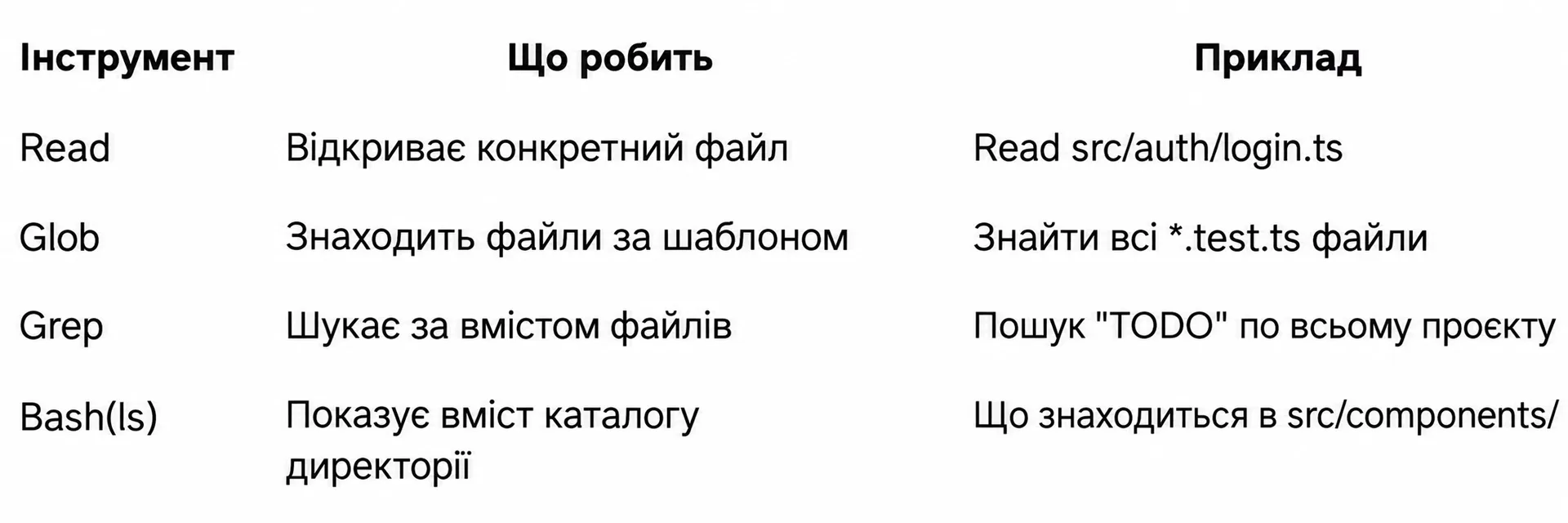
| Tool | What It Does | Common Real-World Example |
| :--- | :--- | :--- |
| **`Read`** | Opens and reads a specific file at an absolute or relative path | `Read src/auth/login.ts` to inspect component logic |
| **`Glob`** | Locates files and directories matching glob patterns or extensions | Finding all `**/*.config.{js,ts}` or test files `*.test.ts` |
| **`Grep`** | Executes regex and full-text substring search across file contents | Finding function call sites or leftover `TODO` markers project-wide |
| **`Bash(ls)`** | Inspects directory hierarchy and lists module files | Discovering contents inside `src/components/` |
> [!NOTE]
> You never need to call these tools manually. Simply state your engineering question in natural language, and Claude Code automatically coordinates the optimal toolchain.
---
## 2. Fast Onboarding in Unfamiliar Projects
When you clone a massive repository for the first time, spending hours manually opening folders and guessing module boundaries is counterproductive. Claude Code provides an accurate architectural picture in seconds.
### Formulating the Architectural Discovery Prompt
Navigate to your project root, launch `claude`, and begin with a broad diagnostic prompt:
```text
Give me an overview of this project. What does it do, what is the tech stack, and how is the code organized?
```
### What the Agent Performs During Scanning
1. **Dependency Manifest Analysis:** inspects `package.json`, `Cargo.toml`, `go.mod`, or `requirements.txt` to identify frameworks and core libraries.
2. **Documentation Review:** checks `README.md`, `ARCHITECTURE.md`, or API specification files.
3. **Directory Tree Evaluation:** assesses modular boundaries (`src/api`, `src/components`, `src/services`, `prisma`).
4. **Summary Generation:** delivers a structured report detailing key modules, entry points, and local development commands.
> [!TIP]
> Claude's architectural summary is generated directly from current source files on disk, avoiding outdated documentation traps.
---
## 3. Targeted Investigation: Tracing Data Flows and Requests
Once you understand the high-level architecture, dive into specific business workflows. Claude Code excels at following execution call traces across multiple application layers.
:::tabs
@tab Authentication
```text
How does authentication work in this project? Trace the lifecycle of a request from the login form submission through JWT validation to the protected database query.
```
@tab Checkout & Payments
```text
What happens when a user submits the checkout form? Trace the request flow from the frontend form to payment gateway processing and email notification dispatch.
```
@tab Webhook Ingestion
```text
Trace how incoming Stripe webhooks are received, verified for signature integrity, and processed in our database transaction worker.
```
:::
### How Claude Traces Execution Pipelines
When you issue a "trace the flow" prompt, the agent:
- Locates the initiating UI form or button via `Grep`.
- Identifies the corresponding API endpoint and router handler.
- Reads the route logic, checking applied middleware and authentication checks.
- Inspects database model queries and presents an end-to-end trace with line numbers.
---
## 4. Deep Pattern Search and Import Refactoring
Using built-in `Grep` and `Glob` engines, Claude Code performs surgical searches for function usages, type imports, and orphaned markers without cluttering your screen with raw terminal dumps.
### Practical Search Queries
```bash
# Locate all consumers of an auth utility
Which files import from @/lib/auth or use the useSession hook?
# Discover unresolved technical debt
Show me all TODO, FIXME, and HACK comments across the codebase with file paths
# Find symbol invocation sites
Where is the calculateDiscount function called, and what parameters are passed to it?
# List recent database migrations
List all migration files in the prisma/migrations/ directory created in the last month
```
Claude groups the matches by logical domain and explains the relevance of each finding rather than simply dumping terminal lines.
---
## 5. Deconstructing and Explaining Complex Code
When dealing with dense legacy code, cryptic regular expressions, or convoluted reactive state, ask Claude for a breakdown.
### Code Deconstruction Prompts
```text
# Middleware pipeline explanation
Explain the middleware execution pipeline in src/server/middleware.ts. What does each middleware do, and in what exact order are they executed?
# Regular expression breakdown
This regex in src/utils/validators.ts is hard to read. Break it down part by part and provide examples of matching and non-matching strings.
# Complex component lifecycle analysis
The state management in UserDashboard.tsx looks overly complex. Explain the state flow, what triggers each useEffect, and where race conditions might occur.
```
The agent doesn't merely summarize the code; it highlights subtle edge cases, concurrency hazards, and potential memory leaks.
---
## 6. Running Code Reviews and Analyzing Git Diffs
Claude Code acts as a tireless local peer reviewer prior to staging changes or opening a Pull Request.
### Code Review Workflows
```bash
# 1. Audit staged changes before committing
git diff --staged | claude -p "Review this diff for bugs, edge cases, security issues, and style problems. Be concise."
# 2. Review difference between current feature branch and main
git diff main...feature-branch | claude -p "Perform a code review of this branch. Focus on performance regressions and breaking changes."
```
### Interactive In-Session Reviews
If you are already inside an active Claude session, run:
```text
Review the changes I made in the last commit. Look for logic bugs, missing error handling, and potential production bottlenecks.
```
Claude inspects the git delta and catches unhandled exceptions or performance regressions before your teammates review the PR.
---
## 7. Modification Tools: Edit, Write, and Bash
Understanding how Claude Code alters your local files is vital for maintaining confidence and safety. Claude uses three primary tools for changes: `Edit`, `Write`, and `Bash`.
```mermaid
flowchart LR
subgraph Filesystem_Modifications["Editing Tools"]
E["Edit Tool
(Targeted line replacement)"]
W["Write Tool
(File creation / full rewrite)"]
B["Bash Tool
(Commands, packages, tests)"]
end
E --> D["Colorized Diff Preview"]
W --> D
B --> D
D --> U{"User Approval"}
U -->|Y| S["Committed to Disk"]
U -->|N| R["Change Discarded"]
```
### The Edit Tool: Surgical Line Replacements
`Edit` performs precise replacements. It targets an exact block of existing code and swaps it with the proposed version, leaving surrounding code unchanged.
```diff
// Sample diff visualized in the Claude Code terminal:
async function fetchUser(id: string) {
- const response = await fetch(`/api/users/${id}`);
- return response.json();
+ try {
+ const response = await fetch(`/api/users/${id}`);
+ if (!response.ok) {
+ throw new Error(`Failed to fetch user: ${response.status}`);
+ }
+ return await response.json();
+ } catch (error) {
+ console.error('Error fetching user:', error);
+ throw error;
+ }
}
```
You always see a clear colorized diff before granting approval.
### The Write Tool: Scaffolding New Modules
`Write` creates entirely new files from scratch or performs clean rewrites of configuration files:
```text
Create a new utility module at src/lib/formatters.ts with helpers for currency formatting, relative timestamps, and phone numbers. Include JSDoc comments.
```
### The Bash Tool: Execution and Verification
`Bash` executes terminal commands to install dependencies, run database migrations, build the project, and execute tests:
```text
Install zod and create a registration form schema in src/schemas/auth.ts, then run typecheck to make sure types align.
```
---
## 8. Full-Stack Multi-File Changes in One Prompt
The greatest advantage of Claude Code over conversational chat interfaces is executing coherent, full-stack refactorings across diverse layers in a single request.
```text
Add a 'phoneNumber' field to the User entity. Update the Prisma schema, generate the migration, update the registration API route, and add the input field to the Profile form component.
```
### How Claude Coordinates Multi-File Edits
1. **Schema Update:** updates `schema.prisma` using `Edit`.
2. **Migration Run:** triggers `npx prisma migrate dev` using `Bash`.
3. **Backend Route Update:** adds validation rules to `src/app/api/user/route.ts`.
4. **UI Adaptation:** inserts the input element inside `src/components/ProfileForm.tsx`.
5. **Type Verification:** runs `npm run typecheck` to guarantee cross-layer type consistency.
Each file modification prompts you for confirmation, giving you complete oversight over every change.
---
## 9. Iterative Refinement and Safe Rollbacks
Working with Claude Code is an interactive conversation. If an edit requires adjustments, you can refine it immediately without repeating the original prompt context.
### Conversational Prompt Refinements
```text
# Refine style
That looks good, but please replace the if/else statements with a concise switch statement.
# Add documentation
Great, now add comprehensive JSDoc comments to all exported functions in this file.
# Optimize performance
Can we memoize this calculation with useMemo to avoid re-computations on each render?
```
### Reverting Changes When Things Go Wrong
If an applied edit produces unwanted behavior, you have two reliable recovery paths:
1. **Ask Claude Directly:**
```text
Undo the last changes you made to src/lib/validation.ts and return the file to its previous state.
```
2. **Use Git in Your Terminal:**
```bash
# Revert a specific file
git checkout -- src/lib/validation.ts
# Discard all unstaged changes across the project
git reset --hard HEAD
```
> [!TIP]
> Always commit your working directory before asking Claude Code to perform large multi-file refactorings. That way, a clean `git checkout` brings you back instantly.
---
## 10. Engineering Best Practices and Final Checklist
Adhering to foundational engineering habits makes Claude Code an indispensable pair programmer.
### Four Rules for Productive Collaboration
1. **One Task per Prompt:** Avoid conflating distinct goals (*"Add OAuth, rewrite the header styling, and delete stale tests"*). Break work down into sequential, atomic prompts.
2. **Always Verify with Tests:** After a series of edits, instruct Claude to run your test suite: `Run npm test and npm run typecheck to make sure everything compiles cleanly`.
3. **Understand the Tooling:** Remember that line replacements use `Edit`, new files use `Write`, and environment commands use `Bash`. Framing prompts around these mechanics produces faster results.
4. **Maintain Context Hygiene:** When finishing a major feature and switching to an unrelated topic, run `/compact` or restart the session to purge unnecessary logs from the context window.
### Knowledge Check
> **1. Which tool does Claude Code use to perform surgical line replacements without rewriting the entire file?**
>
> > [!TIP]
> > **Answer:** The `Edit` tool. It matches an exact block of lines and swaps them while displaying a colorized diff.
> **2. Why doesn't Claude Code read the entire repository into memory on startup?**
>
> > [!TIP]
> > **Answer:** To conserve token limits and keep response latency low. It uses progressive discovery via `Glob`, `Grep`, and targeted `Read` calls instead.
> **3. How can you quickly run a code review on a feature branch compared to main?**
>
> > [!TIP]
> > **Answer:** Run `git diff main...feature-branch | claude -p "Code review this PR"` directly in your shell.
### Daily Practice Checklist
- [ ] Use broad overview prompts when first exploring an unfamiliar codebase.
- [ ] Trace end-to-end workflows with *"Trace the flow from UI to database"* prompts.
- [ ] Run pre-commit code reviews using `claude -p` on staged diffs.
- [ ] Inspect the colorized diff before confirming any `Edit` action.
- [ ] Create a clean git commit before starting large cross-cutting refactors.
- [ ] Conclude each development session by running test and typecheck scripts via `Bash`.