# How to Build Custom Skills for Claude Code: Architecture and Best Practices
> A comprehensive engineering guide to creating custom Claude Code skills: folder structure and SKILL.md, progressive disclosure, skills vs. hooks trade-offs, and evaluation-driven workflow development.
## 1. What Is a Skill and Why It Is a Software Artifact
A **Skill** in Claude Code is a standardized, modular knowledge bundle containing procedural workflows, domain-specific rules, reference guides, or executable scripts that an AI agent loads dynamically to execute a specific class of tasks. Instead of repeatedly pasting long instructional prompts into every new session, the agent autonomously recognizes user intent and pulls in the appropriate Skill on demand.
The fundamental distinction between a Skill and traditional program code lies in its activation mechanism: the language model decides whether to activate a skill based on semantic matching between the skill's description and the user's prompt. This dispatch decision is **probabilistic**—there is no compiler or static type system to guarantee selection. Consequently, the clarity and precision of the metadata directly determine whether the skill triggers when needed.
```mermaid
flowchart TD
subgraph Invocation ["Skill Invocation Pipeline"]
Prompt["User Prompt"] --> Matcher{"Semantic Intent Matcher (LLM)"}
Meta["Frontmatter name + description
(~100 tokens at boot)"] --> Matcher
Matcher -->|Intent Match| Load["Load SKILL.md into Context"]
Matcher -->|No Match| Normal["Standard Execution without Skill"]
end
subgraph Execution ["Execution Pipeline"]
Load --> Steps["Execute Sequential Instructions"]
Steps --> Scripts["Run Bundled Scripts (bash/python)"]
Steps --> Refs["Read Reference Guides (references/)"]
Scripts & Refs --> Result["Final Deliverable Artifact / Code"]
end
```
### Why a Skill Is a Software Artifact, Not Just Text
1. **Versioning and Modularity:** A skill consists of standard repository files, tracks changes via Git, and evolves using conventional software lifecycle practices.
2. **Interface vs. Implementation Separation:** The `description` field in frontmatter functions as the public interface, while the body of `SKILL.md` and bundled scripts represent internal implementation.
3. **Composability:** A skill can trigger external MCP tools, invoke terminal utilities, and delegate sub-tasks to other skills or subagents.
4. **Susceptibility to Regressions:** Carelessly modifying a description can cause silent failure (the skill stops triggering) or execution drift across agent runs.
> [!NOTE]
> The **Agent Skills** specification originated by Anthropic is an open standard. Skills developed according to this specification can be shared and reused across Claude Code and compatible agentic platforms.
---
## 2. File and Directory Structure: SKILL.md, Scripts, and Resources
A skill is structured as a directory in the filesystem, with an obligatory `SKILL.md` file at its core. Depending on task complexity, the skill can package supplementary scripts, documentation, and data templates.
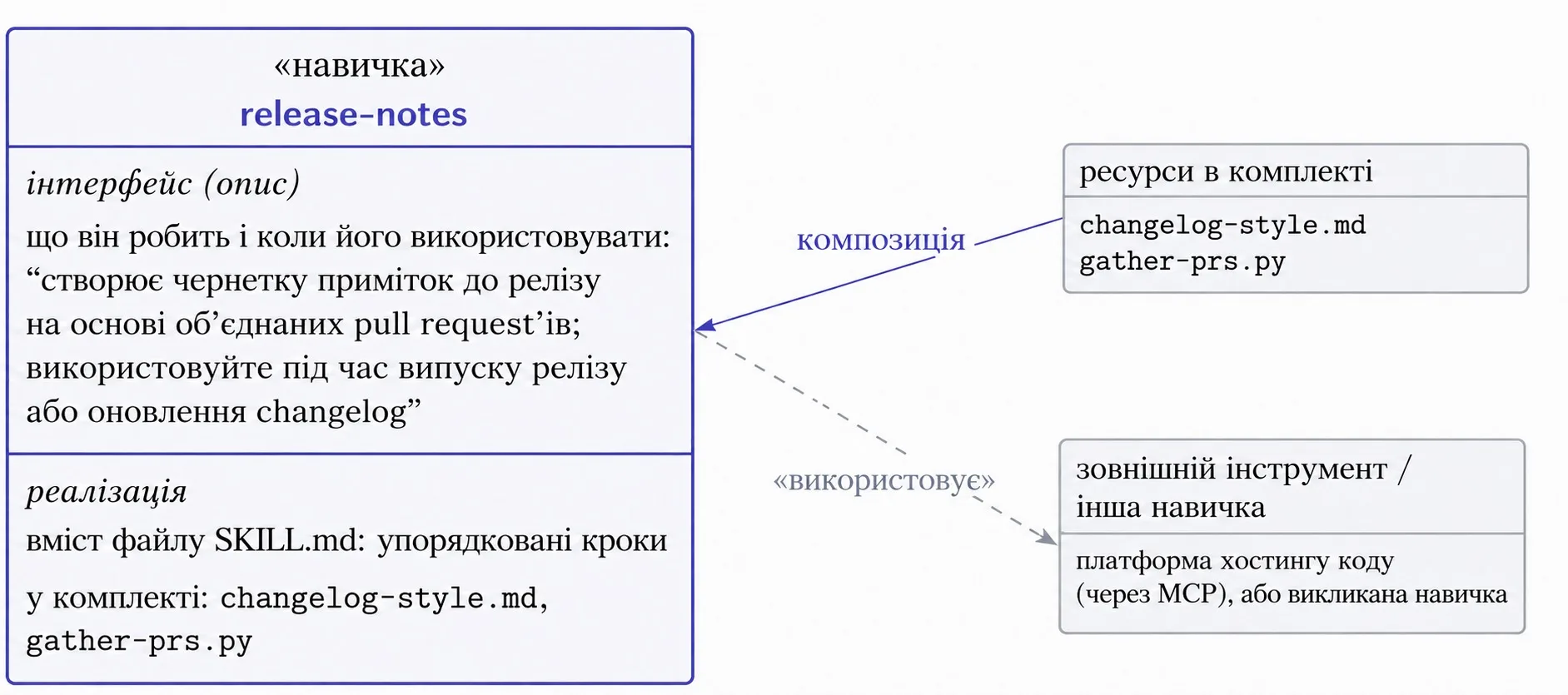
### Skill Storage Scopes in Claude Code
- **Personal Global Skills (`~/.claude/skills/`):** Available across all projects on the current developer workstation. Ideal for personal productivity tools, commit message formatters, or cross-cutting analysis scripts.
- **Project-Specific Skills (`.claude/skills/`):** Stored directly inside the project repository and tracked in Git. Shared across all team members, enforcing uniform architectural and testing standards.
### Recommended Complex Skill Layout
```text
.claude/skills/release-notes/
├── SKILL.md # Mandatory: metadata and workflow steps
├── changelog-style.md # Bundled resource: changelog formatting guide
└── scripts/
└── gather-prs.py # Executable script: API fetcher for merged PRs
```
A minimal skill can consist solely of a single `SKILL.md` file. Larger workflows package automation scripts and reference manuals inside the directory, keeping the core prompt compact and self-contained.
---
## 3. Frontmatter Formatting Standards: Name and Description
Every `SKILL.md` begins with a YAML Frontmatter block. This is the only portion of the skill that Claude inspects during session initialization to assemble its catalog of capabilities.
```yaml
---
name: release-notes
description: Drafts release notes from merged pull requests between two git tags. Use when cutting a release or updating the changelog.
---
```
### Formal Name Constraints
- Maximum length of **64 characters**.
- Permitted characters: lowercase ASCII letters, digits, and hyphens (`[a-z0-9-]`).
- Prohibited: XML/HTML tags and spaces.
- Reserved namespaces: cannot contain the words `claude` or `anthropic`.
### Formal Description Constraints
- Mandatory non-empty string.
- Maximum length of **1024 characters**.
- Prohibited: XML/HTML tags.
- Must articulate both what the skill accomplishes and the contextual triggers for invocation.
| Field | Valid Example | Invalid Example | Violation Reason |
| :--- | :--- | :--- | :--- |
| `name` | `db-migrate-helper` | `Claude-DB-Helper!` | Uppercase characters, exclamation mark, reserved word `claude` |
| `name` | `deploy-staging` | `deploy_` | Underscores and angle brackets are strictly forbidden |
| `description` | `Generates API documentation from Express routes. Use when updating docs.` | `A tool for API` | Excessively brief, ambiguous scope, missing execution triggers |
> [!WARNING]
> If a skill should only execute upon explicit human instruction and must never trigger autonomously, you can configure it as a deterministic slash command by disabling auto-invocation in its frontmatter.
---
## 4. Progressive Disclosure and Context Window Management
Skills do not flood the model's context window upon session startup. Instead, Claude Code relies on **Progressive Disclosure**, stratified across three deliberate tiers.
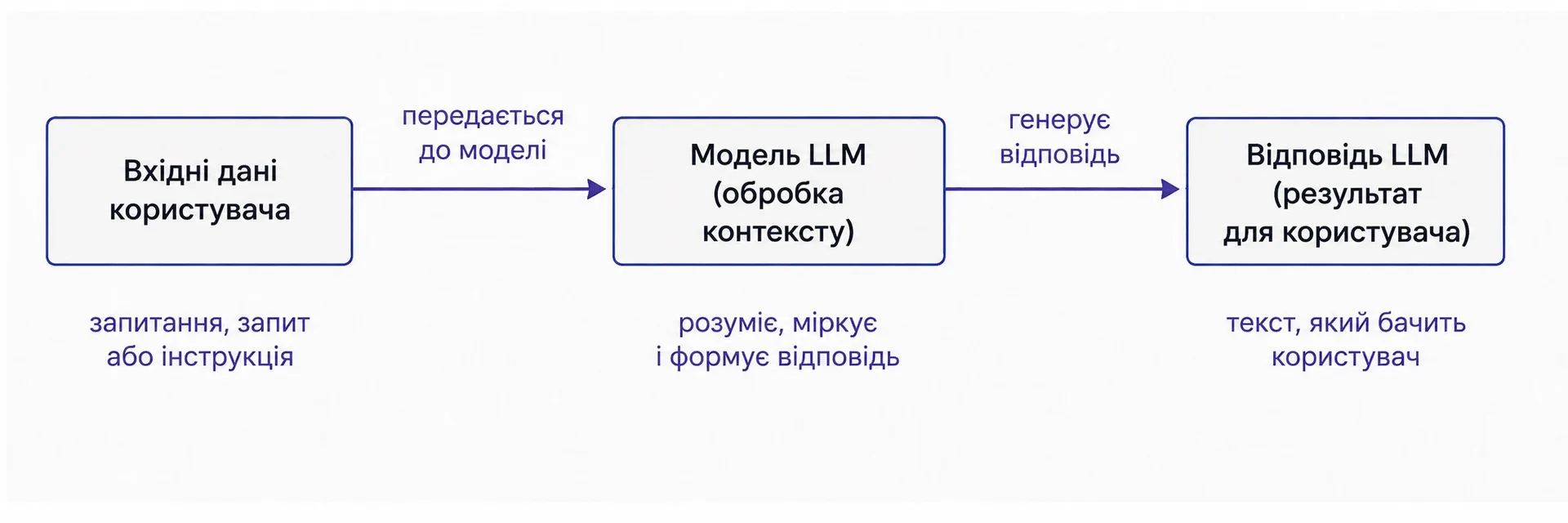
```mermaid
flowchart LR
L1["Tier 1: Metadata
(~100 tokens, always loaded)"] -->|Trigger Match| L2["Tier 2: SKILL.md Body
(~1-3k tokens, loaded on demand)"]
L2 -->|Instruction Reference| L3["Tier 3: Resources & Scripts
(0 tokens until read or executed)"]
```
### The Three Loading Tiers
1. **Tier 1 — Metadata:** The `name` and `description` of every available skill are registered in the system context at startup (~100 tokens per skill). This lightweight footprint allows developers to configure dozens of skills per project without context exhaustion.
2. **Tier 2 — Skill Body:** When the model determines that a prompt matches the skill's description, it reads `SKILL.md`. The body should remain compact (under 500 lines) to prevent displacing ongoing conversation turns.
3. **Tier 3 — Resources and Scripts:** Reference files (`references/`) are read only when directly referenced by an active step. Scripts are typically executed directly via bash; their source code is not injected into the context window, returning only execution stdout/stderr.
---
## 5. Crafting the Description: Building Reliable Activation Triggers
Because `description` functions as the primary activation trigger, authoring it requires careful precision.
### Best Practices for High-Accuracy Descriptions
- **Third-Person Perspective:** Write exclusively in the third person (`Drafts`, `Audits`, `Generates`). The model parses the description as a tool capability signature; second-person pronouns (`You can use this`) reduce semantic matching precision.
- **The "What + When" Formula:** Clearly state what operational capability the skill provides, paired with the specific scenarios or intents that warrant its use.
- **Domain Keywords:** Embed explicit terms, file extensions, and commands that users are likely to include in realistic queries.
:::tabs
@tab Vague Description
```yaml
---
name: release-notes
description: Handles project releases and writes updates.
---
```
*Issue: Lacks concrete trigger conditions. The model cannot determine when to activate the skill.*
@tab High-Precision Description
```yaml
---
name: release-notes
description: Drafts release notes from merged pull requests between two git tags. Use when cutting a release, updating the changelog, or summarizing what changed in a version.
---
```
*Advantage: Explicit input entities (git tags, pull requests) and unambiguous triggers (cutting a release, updating changelog).*
:::
---
## 6. Anatomy of a Production Skill: The release-notes Pipeline
Examining the `release-notes` skill demonstrates how inputs, execution logic, and outputs harmonize within an enterprise skill.
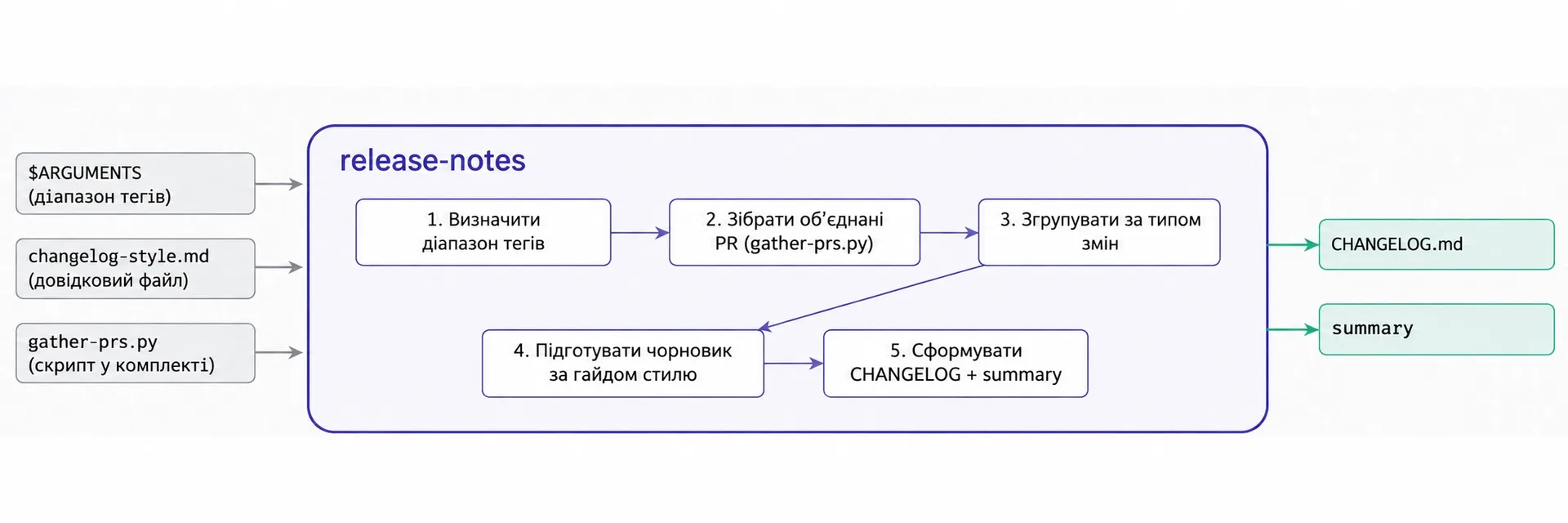
### Core Workflow Components
- **Inputs:** User parameters (tag range `v1.2.0..v1.3.0`), style guide `changelog-style.md`, and helper script `gather-prs.py`.
- **Sequential Pipeline in `SKILL.md`:**
1. Determine git tag range.
2. Execute `python scripts/gather-prs.py` to retrieve structured pull request metadata.
3. Group changes by category (Features, Fixes, Performance, Breaking Changes).
4. Draft release notes conforming to `changelog-style.md`.
5. Append entry to `CHANGELOG.md` and present an executive summary.
- **Output Artifacts:** Updated `CHANGELOG.md` and a clean release briefing in the terminal.
### Content Guidelines for the Skill Body
1. **Avoid Restating Fundamentals:** Treat Claude as a senior engineer; do not explain generic git or programming concepts. Focus strictly on proprietary project rules and constraints.
2. **Single-Level Reference Depth:** Reference files must not link to additional nested files. Keep all resources directly accessible from `SKILL.md`.
3. **Cross-Platform File Paths:** Always use forward slashes (`/`) in all filesystem path references.
---
## 7. The Customization Landscape: Skills, CLAUDE.md, Commands, MCP, Hooks, and Plugins
Claude Code provides seven distinct customization mechanisms. Choosing the wrong mechanism is the leading cause of agentic unreliability.
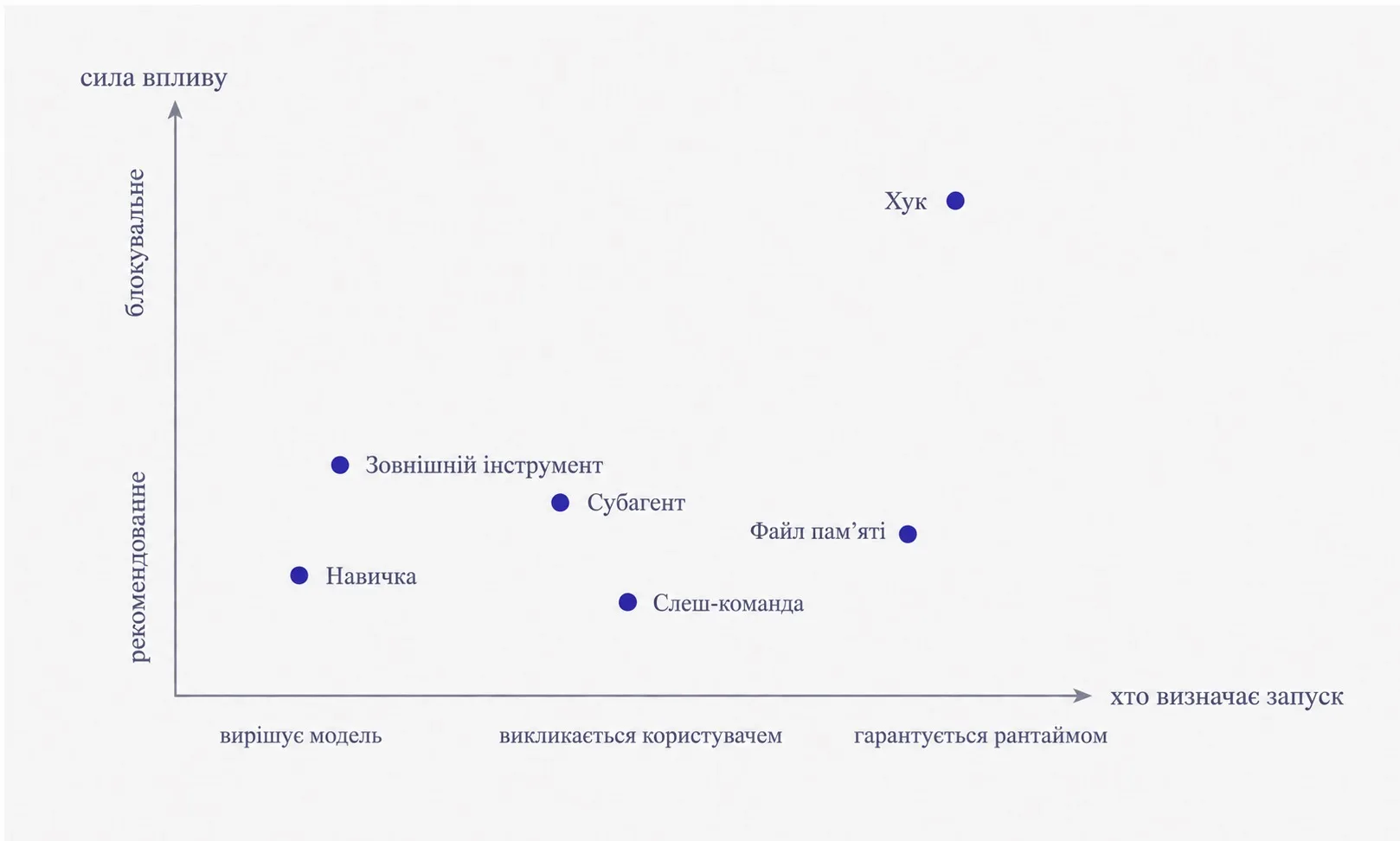
| Mechanism | Invocation Authority | Enforcement Strength | Primary Application |
| :--- | :--- | :--- | :--- |
| **CLAUDE.md (Memory)** | Runtime (Always loaded) | Advisory | Global project style, repository layout, build commands |
| **Skill** | Model (Semantic) or User | Advisory | Complex procedural workflows with bundled assets and scripts |
| **Slash Command** | User (`/command`) | Advisory | Reusable prompt templates invoked explicitly on demand |
| **Subagent** | Model or User | Isolated | Delegating decoupled, heavy tasks to an independent context |
| **MCP Tool** | Model (Tool Call) | Executable | External system integration (Databases, GitHub API, Jira) |
| **Hook** | Runtime (Deterministic) | **Blocking** | Strict guardrails, pre-commit linters, destructive action filters |
| **Plugin** | User (Installation) | Comprehensive | Distribution bundle combining skills, MCP servers, and hooks |
> [!IMPORTANT]
> Only mechanisms controlled directly by the runtime (such as **Hooks**) provide deterministic execution and blocking authority. Instructional text in a Skill remains advisory; the model follows it probabilistically.
---
## 8. Skills vs. Hooks: Advisory Guidance vs. Runtime Enforcement
A common pitfall is attempting to enforce security rules or mandatory file formatting through Skills. A Skill guides; it cannot block. Deterministic enforcement requires Hooks.
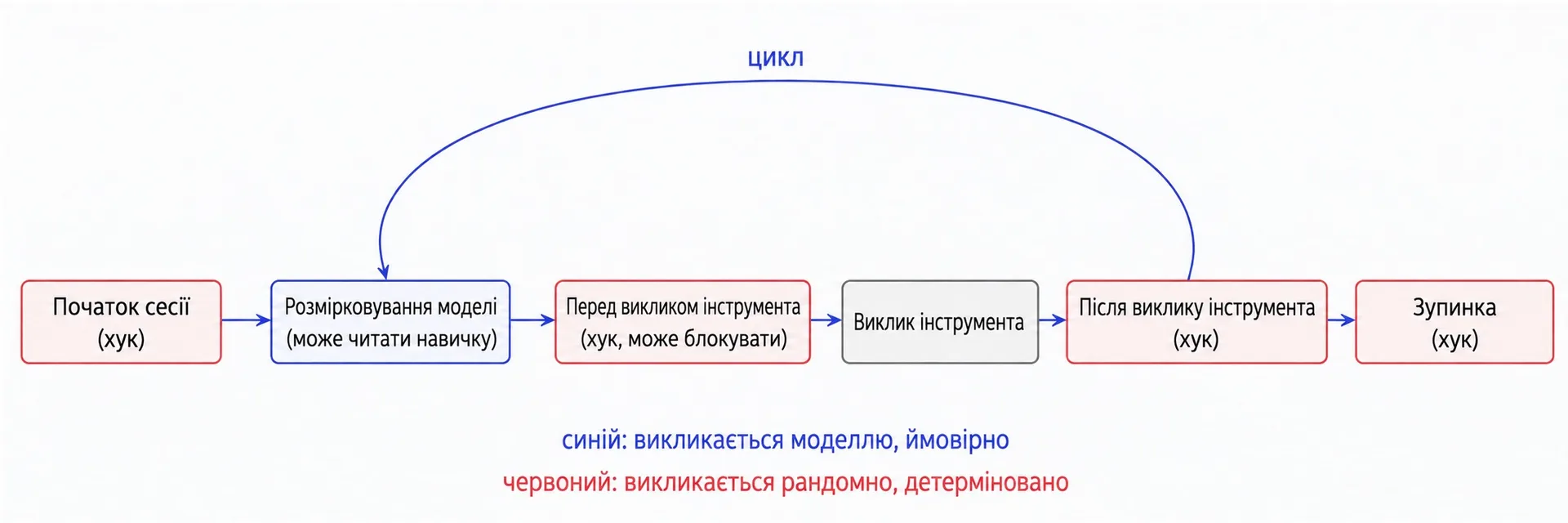
### Key Lifecycle Events
- **SessionStart (Hook):** Fires upon session launch. Guarantees environment checks or branch validations.
- **Model Reasoning (Skill Match):** The model analyzes the request and dynamically reads `SKILL.md`.
- **PreToolUse (Hook, Blocking):** Intercepts actions before execution. Can evaluate bash commands and halt execution (exit code 2) if security rules are violated.
- **PostToolUse (Hook):** Fires immediately following tool completion (e.g., auto-formatting modified files with Prettier).
- **Stop (Hook):** Executes when the model concludes its response.
```text
Architectural Decision Rule:
- Requires domain context and engineering judgment ──► Author a SKILL
- Must execute unconditionally without exception ──► Configure a HOOK
```
---
## 9. Evaluation-Driven Development for Agent Skills
Reliable skill engineering follows an evaluation-first methodology, mirroring test-driven software development.
### Four Steps of Evaluation-Driven Design
1. **Establish Baseline Failures:** Prompt Claude Code with realistic user tasks without the skill. Record where it hallucinates, misses edge cases, or strays from standards.
2. **Build an Evaluation Suite:** Convert those failure modes into a compact set of repeatable test prompts with explicit expected outputs.
3. **Draft the Minimal Skill (MVP):** Author the minimum necessary instructions in `SKILL.md` to satisfy the evaluation suite.
4. **Iterative Refinement:** Add constraints and edge-case instructions only when prompted by test failures, avoiding unnecessary context bloat.
### The Two-Model Development Loop
Accelerate skill design using two separate agent instances:
- **Editor Instance:** A collaborative session where you brainstorm, refine, and structure the skill's instructions.
- **Tester Sandbox:** A pristine, freshly launched session containing only the skill under test, verifying whether it triggers autonomously and executes reliably.
---
## 10. Design Patterns and Anti-Patterns in Skill Development
Practical deployments have surfaced distinct architectural patterns and anti-patterns.
### Proven Design Patterns
- **Numbered Deterministic Pipelines:** Structure multi-step actions as explicit sequential items (`1. ...`, `2. ...`, `3. ...`).
- **Embedded Verification Checklists:** For delicate tasks, provide a markdown checklist the model can copy into its reasoning buffer.
- **Self-Correcting Loops:** Instruct the model: "Run test suite -> identify failures -> repair code -> re-test until clean."
- **Plan-Before-Write Protocols:** For destructive or bulk operations, require the model to draft a proposed modification table before mutating files.
### Critical Anti-Patterns to Avoid
- **Decision Paralysis:** Listing too many alternative libraries without designating an explicit default.
- **Undeclared Dependencies:** Calling CLI utilities or packages without verifying their availability or installation commands.
- **Windows-Style Backslashes:** Hardcoding `\` path separators, which fails on Unix-based runtimes.
- **Magic Constants:** Introducing unexplained numeric thresholds, sleep intervals, or timeouts.
---
## 11. Security and Auditing Third-Party Skills Before Installation
A skill is executable code operating within your development environment. Because Claude Code commands file, shell, and network access, unvetted skills pose significant supply-chain risks.
### Pre-Installation Audit Checklist
- [ ] **Inspect `SKILL.md`:** Review instructions for prompt injection attempts, hidden system overrides, or unauthorized file access.
- [ ] **Audit `scripts/` Directory:** Carefully examine all bundled Python and shell scripts to ensure they do not exfiltrate environment secrets or make untracked network requests.
- [ ] **Verify External URLs:** Inspect all outbound links for dynamic script downloads or payload injection.
- [ ] **Sandbox Execution:** Initially test third-party skills in an isolated sandbox repository with mock credentials before adopting them across production repositories.